

The coronavirus has highlighted the importance of the internet in most households, and if your family is struggling with spotty Wi-Fi, it might be time to consider giving the gift of a faster router for the holidays.
Our Picks

Last year, the Asus RT-AC86U finished right at the top of the pack in our gaming router tests, even beating out fancier, flashier, more expensive competitors. Now, in 2020, the brand is back with a follow-up called the Asus RT-AX86U -- and as the switch from "AC" to "AX" indicates, it supports Wi-Fi 6, the newest, fastest and most efficient version of Wi-Fi.
Pros
- Terrific use of Wi-Fi 6, with fast speeds and excellent range
- Best-in-class latency management
- Multi-gig WAN port
- Full-featured app with device prioritization
Cons
- Somewhat bulky design
- No additional 5GHz band for dedicated gaming traffic
- "Smart Connect" band steering slows down average speeds


If you want the ultimate Wi Fi router upgrade, then you should look for a couple of things. You want speed, obviously -- but you'll notice the biggest difference if you make the jump to a mesh system designed to keep those speeds consistent for connected devices throughout your entire home from your iPad or tablet to your smartphone. And, among mesh routers, the feature that makes the biggest impact on performance is triband design, where you get the standard 2.4 and 5GHz bands plus an additional 5GHz band that you can dedicate to local network traffic between the router and the satellites. That speeds everything up.
Pros
- Fastest mesh router we've ever tested in our real-world speed tests
- Simple, app-based setup and network management
- Multigig WAN port
- Support for Alexa and the Google Assistant lets you activate a guest network or pause the Wi-Fi to a misbehaving kid's device with a quick voice command.
Cons
- You'll need an internet plan of at least 500Mbps to notice much of a difference
- Lacks advanced features or unique functions
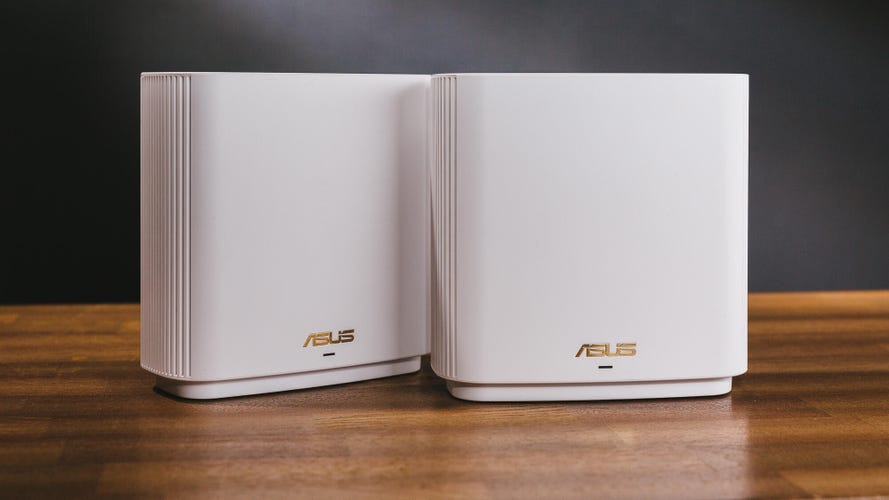
If the $199 Eero 6 is your entry-level Wi-Fi 6 mesh router, and the $699 Netgear Orbi AX6000 is your top-of-the-line splurge, then the $449 Asus ZenWiFi AX is the sensible middle-ground pick that's probably the easiest to justify buying. The system flat-out aced our tests earlier this year, and finished in a close second to Netgear in terms of overall performance. That's exceptional given that the two-piece Asus system costs about $250 less than the two-piece Orbi AX6000 setup.
Pros
- Full support for Wi-Fi 6
- Tri-band design with dedicated wireless backhaul
- Stable mesh performance
- Multigig WAN port on each device
Cons
- Limited speeds on the 2.4GHz band
- Quality of Service engine requires third-party data-sharing
WIRELESS ROUTER DEALS OF THE WEEK
- $1,700 (save $600)
- $280 (save $70)
- $100 (save $30)
- $200 (save $130)
- $96 (save $104)
Between a surge of options in the mesh category and the debut of speedy new Wi-Fi 6 routers, there are plenty of options to consider, but we can help you narrow your search with our picks for a router gift. We update this list periodically.
Read more: The best Wi-Fi routers in 2020

Pros
- Terrific use of Wi-Fi 6, with fast speeds and excellent range
- Best-in-class latency management
- Multi-gig WAN port
- Full-featured app with device prioritization
Cons
- Somewhat bulky design
- No additional 5GHz band for dedicated gaming traffic
- "Smart Connect" band steering slows down average speeds
Last year, the Asus RT-AC86U finished right at the top of the pack in our gaming router tests, even beating out fancier, flashier, more expensive competitors. Now, in 2020, the brand is back with a follow-up called the Asus RT-AX86U -- and as the switch from "AC" to "AX" indicates, it supports Wi-Fi 6, the newest, fastest and most efficient version of Wi-Fi.
We're still in the process of putting this gaming router through its paces, but after testing it out at my home, I've seen enough to say that this $249 gaming router is one of the best you can buy. Not only was it able to blanket my entire home with a fast, reliable Wi-Fi 6 connection, no range extenders needed, but it also held my latency below 20ms across well over a hundred speed tests from various spots throughout my house. Low latency like that is key for online gaming, and the RT-AX86U keeps latency at bay better than any other router I've tested. Ever.
Even if you aren't a gamer, this is about as rock-solid as routers get, and it would make a terrific gift for anyone in need of a home networking upgrade. The true die-hards might be tempted to hold out for the Asus GT-AXE11000, a triband gaming router coming this December with support for Wi-Fi 6E, which adds in access to the 6GHz band as sort of an exclusive fast lane for the most advanced devices. But routers like that one are overkill for almost everyone, and they'll cost hundreds more than what the RT-AX86U is selling for. If you're shopping for a router to give as a gift in 2020, this is the first one I'd point you towards.

OK, so the uninspired white plastic is about as generic as it gets, but it was Eero that first brought mesh to the masses several years ago -- and when it comes to the software and algorithms that make multi-point mesh networking possible, Eero does it better than just about everyone else. Now, a year after getting acquired by Amazon, Eero is back with brand new mesh systems just in time for the holiday buying season -- and they add in support for Wi-Fi 6 (sensing a theme here?)
Your new flagship is the Eero 6, pictured above. Available in a two-pack with the system's router and one range-extending satellite device for $199, it's about as inexpensive as Wi-Fi 6 mesh routers get, and it also adds in a built-in Zigbee radio that'll let you pair things like Philips Hue bulbs with Amazon's Alexa without need of an extra hub. It won't be as blazingly fast as some of the other routers on this list, but it'll still be able to maximize speeds in homes with internet connections of 500Mbps or less, which is basically everyone who doesn't have a gigabit connection (in other words, most of us). And if you ever want to expand the range of your system, additional satellite devices are just $89 apiece.
Those looking for something a little more powerful should invest in a triband mesh router that can dedicate a third band to network traffic between the router and satellites. You can keep reading for some suggestions, or you can take a look at the Eero Pro 6, which offers exactly that at a price of $399 for a two-pack. But in the majority of cases, the regular Eero 6 should be more than enough to help you get the most out of your home's internet connection.

Pros
- Fastest mesh router we've ever tested in our real-world speed tests
- Simple, app-based setup and network management
- Multigig WAN port
- Support for Alexa and the Google Assistant lets you activate a guest network or pause the Wi-Fi to a misbehaving kid's device with a quick voice command.
Cons
- You'll need an internet plan of at least 500Mbps to notice much of a difference
- Lacks advanced features or unique functions
If you want the ultimate Wi Fi router upgrade, then you should look for a couple of things. You want speed, obviously -- but you'll notice the biggest difference if you make the jump to a mesh system designed to keep those speeds consistent for connected devices throughout your entire home from your iPad or tablet to your smartphone. And, among mesh routers, the feature that makes the biggest impact on performance is triband design, where you get the standard 2.4 and 5GHz bands plus an additional 5GHz band that you can dedicate to local network traffic between the router and the satellites. That speeds everything up.
The best router like that? That'd be the Netgear Orbi AX6000, a high-powered Wi-Fi 6 mesh router that's designed to handle gigabit speeds and then some. In fact, it notched the fastest top speeds we've ever seen from a mesh router, and performed like a champ throughout multiple rounds of gaming router tests at our lab, at the CNET Smart Home, and at my own home here in Louisville, Kentucky.
At $699 for a two-piece system, this version of Orbi is about as expensive as routers get, so pencil it in for someone on the extra-extra-nice list.

Pros
- Full support for Wi-Fi 6
- Tri-band design with dedicated wireless backhaul
- Stable mesh performance
- Multigig WAN port on each device
Cons
- Limited speeds on the 2.4GHz band
- Quality of Service engine requires third-party data-sharing
If the $199 Eero 6 is your entry-level Wi-Fi 6 mesh router, and the $699 Netgear Orbi AX6000 is your top-of-the-line splurge, then the $449 Asus ZenWiFi AX is the sensible middle-ground pick that's probably the easiest to justify buying. The system flat-out aced our tests earlier this year, and finished in a close second to Netgear in terms of overall performance. That's exceptional given that the two-piece Asus system costs about $250 less than the two-piece Orbi AX6000 setup.
With outstanding range, reliability and top speeds, plus key additions like a multigig WAN port, a triband design, and a feature-rich app, the Asus ZenWiFi AX checks all of the boxes I'd look for in a high-end mesh router -- and while specs like that don't come cheap, it'll still get you there for less cash than the competition. If anything, this might be the router option that you should gift to yourself.

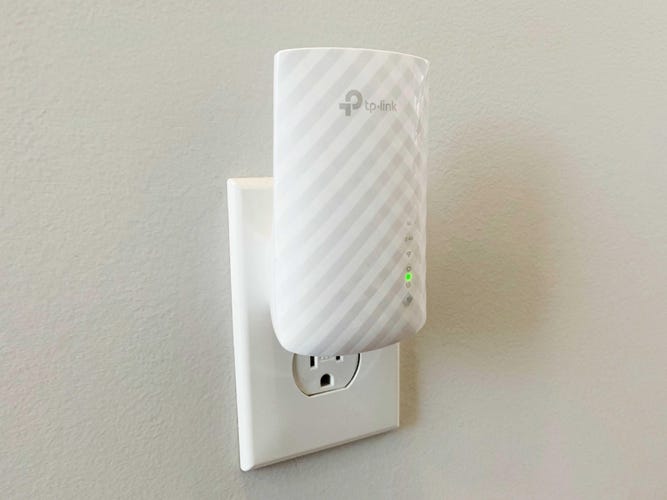
Not looking to spend hundreds on an entire new router? You can expand the range of your wireless network for a lot less by going with a simple, plug-in range extender instead. I tested several out earlier this year, and the best of the bunch was the TP-Link RE220, available for just $25.
The RE220 was the least expensive range extender I tested, but you wouldn't know it from the performance. While other, more expensive extenders struggled to hold speeds above 50Mbps in the back of my house, where the Wi-Fi typically drops out, the RE220 was able to hold speeds comfortably above 80Mbps, and it never dropped my connection once. Just plug it in, press a button to pair it with your router, and boom, signal boosted. It'll stuff a stocking just fine.
