


Getting a wired TV streaming device will connect directly to your Internet by plugging it in with Ethernet cable. Using a streaming device like this will prevent stuttering interruptions and buffering warnings from having too many things connected to your Wi-Fi at once. While many game consoles and smart TVs have built-in Ethernet ports, many media streamers are Wi-Fi-only, although some work with a cheap adapter. We've spent hours testing streaming devices wired to the internet via Ethernet cable and here's a list of our favorite options. Some of these devices have built-in Ethernet ports, while others work with Ethernet adapters. Note that all the products below also work via Wi-Fi.
Our Picks

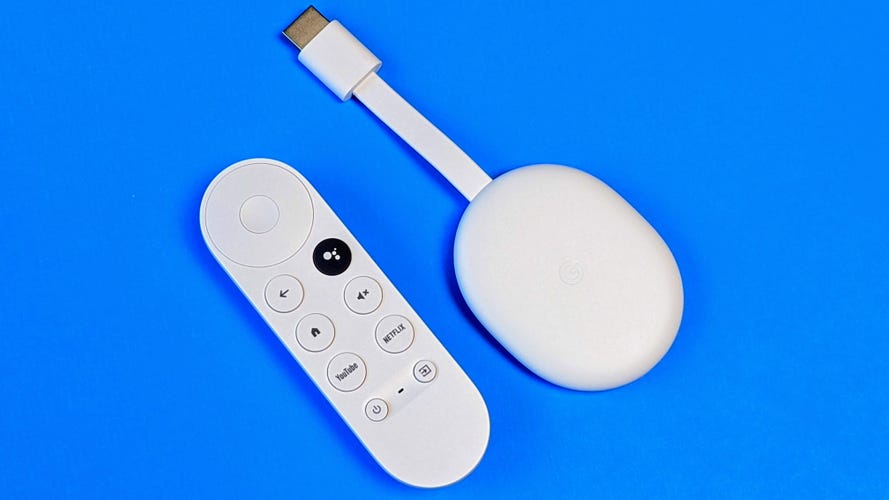
Google makes a cheap adapter that lets you connect a wired Ethernet cable to its Chromecast streamers, including the excellent Chromecast with Google TV. The combo costs a total of $65 -- $50 for the Chromecast and around $15 for a compatible adapter. We like Roku's system better than Google TV but it's very close, and in some ways, particularly Google Assistant voice support, this media streaming device combo is a better choice than the Roku Ultra and a close second to the Express 4K Plus.
Pros
- Useful remote
- Large app selection
- Makes excellent use of the Google Assistant
- Ties in well with YouTube TV, Google Photos
Cons
- Can lag when switching apps or using voice.
- Assistant doesn't always give the best option to play back content


Your Xbox or PlayStation has an Ethernet connection and plenty of streaming video apps, but the Shield is more versatile and includes a real remote control so you don't have to navigate Netflix with your game controller. In addition to streaming in 4K and HDR with access to thousands of Android TV apps, it offers a robust library of games -- from GeForce Now and Google Stadia cloud gaming, PC streaming including Steam Link to numerous native console-level and Android games -- built-in Google Assistant complete with smart home control, NAS access, Plex server capability, HDHomeRun integration and more.
Pros
- Cutting-edge streaming with 4K AI upscaling, Dolby Vision
- Native Android, cloud gaming and Steam Link options
- Improved Android TV interface with Google Assistant
Cons
- Expensive
- Some issues understanding voice commands
- Slower than Roku to launch Netflix

STREAMING PLAYER DEALS OF THE WEEK
- $70 (save $30)
- $75 (save $25)
- $170 (save $10)
Best overall wired TV streaming device
The Roku Express 4K Plus is rated as our best overall streaming device and that continues to be the case here. The Express 4K Plus does not come with an Ethernet adapter when you purchase the device, but you can add one by picking up an adapter for $10 to $15 from Amazon.
It's not the most elegant solution, but picking up a third-party adapter will save you a significant amount of money over a device that has an Ethernet port built-in. The setup is fairly straightforward -- all you have to do is connect the adapter wire to the streaming device and plug in the Ethernet into the adapter -- and then you're up and running.
Best wired TV streaming devices of 2025

The top spot on this list used to be occupied by Roku's most expensive player, the Ultra, but the Express 4K Plus has replaced it. Roku is our favorite streaming system as it has all the major streaming apps, the simplest interface and a content-agnostic platform that doesn't push any particular media-streaming provider, like Amazon Prime Video or Apple TV Plus, over another. The Express 4K Plus also streams in 4K HDR, though this Roku device lacks Dolby Vision.
Unlike the Ultra, the Express 4K Plus doesn't have a built-in Ethernet port on its small dongle-sized body, but you can easily add one with a $10-to-$15 adapter from a retailer like Amazon (we tested it with a cable from a company called UGreen and it worked fine). This combo isn't as elegant as a built-in adapter, but it would be around $50 cheaper than the $100 Ultra.
Note that the price below does not include the adapter.

Pros
- Useful remote
- Large app selection
- Makes excellent use of the Google Assistant
- Ties in well with YouTube TV, Google Photos
Cons
- Can lag when switching apps or using voice.
- Assistant doesn't always give the best option to play back content
Google makes a cheap adapter that lets you connect a wired Ethernet cable to its Chromecast streamers, including the excellent Chromecast with Google TV. The combo costs a total of $65 -- $50 for the Chromecast and around $15 for a compatible adapter. We like Roku's system better than Google TV but it's very close, and in some ways, particularly Google Assistant voice support, this media streaming device combo is a better choice than the Roku Ultra and a close second to the Express 4K Plus.
Note that the price below does not include the adapter.

Although the Apple TV 4K costs more than twice as much as the options above, it's the better choice for people who can appreciate its advantages. Those include compatibility with Dolby Vision HDR, flexible upconversion, superior voice command features, a better remote and a slick user interface. The Apple TV 4K is so good for media streaming, it even makes sense if you're not an "Apple person."

Pros
- Cutting-edge streaming with 4K AI upscaling, Dolby Vision
- Native Android, cloud gaming and Steam Link options
- Improved Android TV interface with Google Assistant
Cons
- Expensive
- Some issues understanding voice commands
- Slower than Roku to launch Netflix
Your Xbox or PlayStation has an Ethernet connection and plenty of streaming video apps, but the Shield is more versatile and includes a real remote control so you don't have to navigate Netflix with your game controller. In addition to streaming in 4K and HDR with access to thousands of Android TV apps, it offers a robust library of games -- from GeForce Now and Google Stadia cloud gaming, PC streaming including Steam Link to numerous native console-level and Android games -- built-in Google Assistant complete with smart home control, NAS access, Plex server capability, HDHomeRun integration and more.

This is technically the cheapest current device with Roku's streaming system and an Ethernet port. The savings compared to the actual, non-LT Ultra isn't much, however, and it lacks that device's slick extras like Dolby Vision, programmable keys, fast app launching and the remote finder.


