
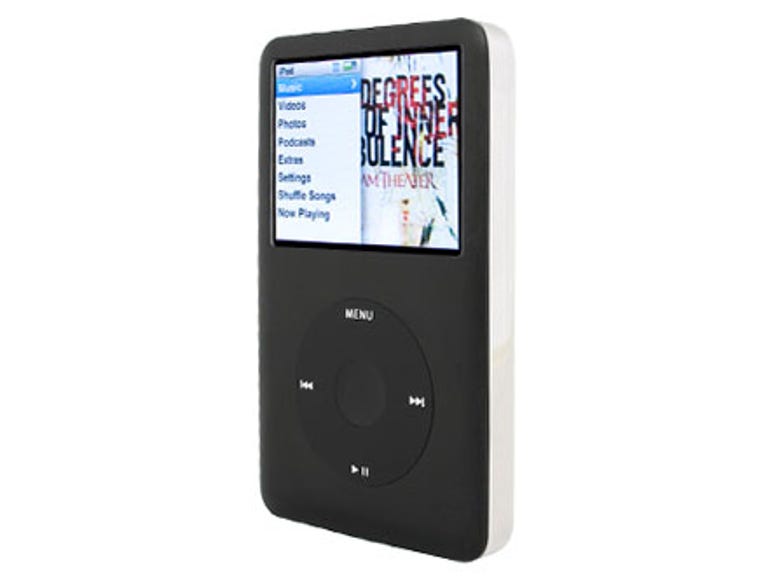
Almost a full two years since its last full-size iPod, Apple has unleashed the iPod classic. Coming in 80GB and 160GB capacities -- costing £159 and £229 respectively -- the classic can hold a massive archive of music and video. There's no need to pick and choose which music goes with you, even if you rip CDs at the very highest lossless quality. We wasted no time in stress-testing the classic to within millimetres of its life. The classic is available now from Apple stores or the company's Web site.
Apple iPod classic
The Good
The Bad
The Bottom Line
Design
The glossy and easily scratched faceplate of previous models has been replaced with an attractive matte texture, either in black or silver -- white is no more. The Click Wheel too has been steered from shiny gloss to matte, the result being a less scratch-prone finish. The reflective silver casing is unchanged though, and still easily scuffable -- seven days into the classic being used as our 'full-time' MP3 player, several scratches had appeared.
An unchanged 64mm (2.5-inch) 320x240-pixel full-colour screen still consumes the top half of the player's front. The new iPod nano's screen has the same pixel count in a smaller display, leaving us feeling a little left out -- why not up the classic's resolution a notch?
Features
The most exciting new feature is Cover Flow. You've seen it in action with iTunes -- it's that arty way of browsing your CD collection by the cover art. We've long hoped it would come to the iPod, and now it has. It works just like in iTunes, only it's now on a white background instead of black. You'll need to ensure most of your music files have album art embedded or you'll see a lot of generic grey album covers floating around. Browsing Cover Flow is easy with the Click Wheel and, hell, it's darn pretty too!
A new UI splits the main menu screens into two halves: the left half contains the traditional blue-on-white menu, while the right contains floating album art. Artwork slowly moves around the right-hand side of the screen as you navigate through menus. This is all well and good unless you've got, shall we say, 'Grandma-unfriendly' album covers floating around while demonstrating the interface to friends.
In fact, album art is used widely in the classic. In addition to Cover Flow and floating menu art, small covers sit beside albums as you browse through artists. Floating menu art doesn't appear in these menus, so there's plenty of room. Art is much more attractively displayed on the 'now playing' screen, in as much as it's slightly larger than on previous models and a reflection is displayed below it.

The classic retains the supported codecs of the fifth-gen video iPod-- it plays MP3s, AACs, Apple Lossless, WAV, AIFF music files andaudiobooks from Audible.It'll also handle high-quality video in H.264 MPEG-4 format, plusQuickTime movies and your photo libraries. No longer can you outputvideo via the headphone socket though. Apple now forces you to buy another proprietary video cable for playing content on your TV. So much for investing in Apple accessories.
Some fun games are included, including a game show-esque title called iPod Quiz,which asks a plethora of questions about your music collection. Anygames you've already bought from the iTunes Store won't work, or indeedany you go ahead and buy now. Rumour has it that a firmware update iscoming to rectify this issue, but hasn't been confirmed at the time ofwriting.

A handy search feature lets you tap out words to search for inyour library. Again, this instantaneous search mimics thelightning-fast system in iTunes. Podcasts no longer reside inside the'music' sub-menu; they now sit as an option within the main menu. Stillsitting in the 'extras' menu, however, are the stopwatch, calendar,alarm clocks, notes, contacts and so on. No new additions here.
Performance
Sound quality is mostly unchanged and ifyou don't use decent headphones, you won't notice anything.Significantly, Apple has changed its supplier of audio-decoding chips.These are responsible for sound quality, and until now Apple has usedchips from Wolfson Microelectronics. The new chips from Cirrus Audioproduce a moderately 'cleaner' sound, with a marginal increase intreble. Maximum volume is also slightly lower, though playing an iPodthrough headphones at maximum volume has never been a good idea.
We pumped a lossless rip of Electric Uncle Sam by Primus through our classic, using our Denon AH-D5000headphones. Highs were neatly defined and exceptionally clear, and midswere punchy and powerfully well-reproduced. The unfathomably deep andexplosive bass of Pendulum's Tarantula was nothing short ofgalactic in its warmth and power. Whether you're calmly enjoying KTTunstall or revelling in the sound of a thousand suns imploding, you'llbe happy with the sound the classic produces.

Navigating through the main menu, however, can quickly becometedious. When you return to the main menu, album art is loaded from thehard disk. This requires the iPod to find the art on a spinning disk.This takes up to three seconds, during which you might find yourselfgetting frustrated. This can almost certainly be fixed with a firmwareupdate from Apple. Cover Flow works well, though. The classic loads agreat deal of art in one go, but if you have a boat-load of music, fastscrolling results in some generic covers as the 'Pod catches up withitself.
Video performance is unchanged from the classic's predecessor-- high-quality video looks amazing, and with the cable mentionedabove, can be pumped straight into a TV. It's worth noting that unlikeprevious models, video podcasts -- like audio podcasts, in fact -- playin sequence, so you won't need to select episode two to play at the endof watching episode one. The handy resume feature will remember pausepositions of your podcasts and audiobooks, if set in iTunes (it's setto do this by default). iTunes will also handle video conversion ifyour clips aren't compatible with the player.
Apple claims the 160GB iPod classic will keep blasting musicfor a full 40 hours, and video for seven; the 80GB model keeps goingfor a more modest 30 hours for music, five for video. Our lab testswill confirm or deny these claims, so check back soon. Charging ispretty swift too, at around four hours for a complete charge. You'llneed to use the proprietary iPod USB cable to charge from your PC or goand buy an iPod mains adaptor from Apple.

Conclusion
With its vast and unthinkably capacioushard disk options, the iPod classic is quite simply going to squeezeyour entire media collection in your pocket. Sound quality is terrificand even a previous iPod sceptic in our office conceded that theclassic does sound better than he expected. There are a few bugs withcertain aspects of menu navigation, but we trust these will be fixedwith firmware updates, just as bugs with previous models wererectified.
If you love your lossless music, your video podcasts, completeTV series and countless thousands of photos, you should certainlyconsider the iPod classic -- for this price, it's a steal. However, ifyou're just casually interested in the occasional TV clip and the highquality of lossless audio doesn't justify the extra memory, take a peekat the new iPod nano -- for half the price of the classic, you get a great feature set and a much smaller form factor.
Available from AdvancedMP3Players.
Edited by Jason Jenkins
Additional editing by Nick Hide