


Design
Belkin's approach to routers has, in the recent past, been less focused on things that look like routers, and more on objects that wouldn't look all that out of place on the set of Star Trek — or at least on the set of a cheap fan-produced Star Trek homage, anyway. We've commented previously that the company's N1 Vision line are amongst the easiest of routers to understand at a visual level, thanks to the inclusion of large and clear front panel displays that do more than just flash incomprehensible lights at you in fit-inducing patterns.
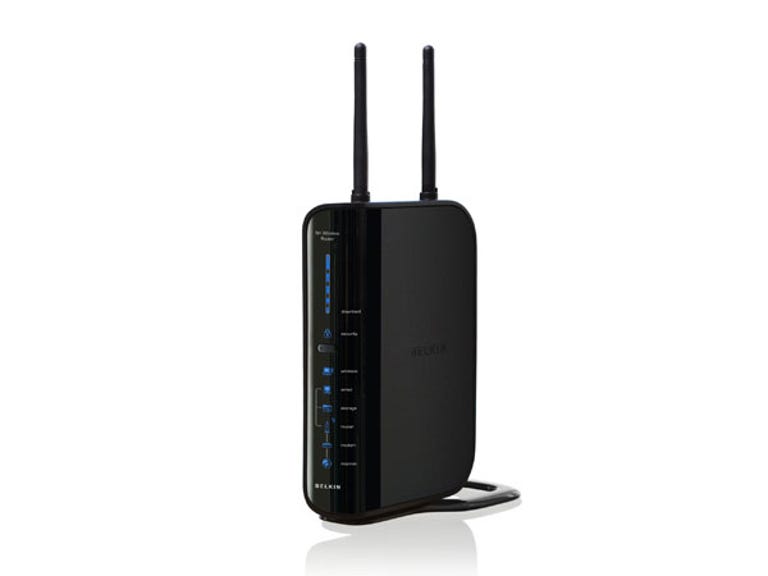
Belkin N+ Wireless Storage Router
The Good
The Bad
The Bottom Line
Which is why the N+ Wireless Storage Router really took us by surprise, because it's a reversion to an older way of thinking about router design. Gone is the spiffy front panel with controls too. Even the large icon symbols are reduced to tiny stature on the side of this vertically oriented router, making them tougher to read from a distance. It's perhaps a less showy design, but at the same time it's also much more utilitarian.
Features
As its name suggests, the two big selling points for the N+ Wireless Storage Router are the inclusion of storage capabilities, and the inclusion of 802.11n networking. On the minus side — and perhaps fitting with this router's rather retro styling — it's supplied with only 2.4GHz Wireless-N, and not the (theoretically) less interference prone 5GHz capability. WPS (Wi-Fi Protected Set-up) is supported, and like most modern routers, actually getting the N+ up and running is quite simple. It's not a modem-router, however, so you will need a modem as well.

The storage side of the router is handled via a USB port on the rear of the unit. Plug any type of USB storage to the router, run Belkin's Storage Manager software on the PC of your choosing, and you've got access to a very simple shared network drive whenever you need it.
Performance
There's a word to sum up the N+'s storage credentials, and that word is ordinary. In our tests, it worked fine across a number of machines, but the Storage Manager software lacks functionality that you might expect of a network attached storage device. You can't set quotas, protect the drive or even format it from within the router set-up, for example. At a basic level it works, and that's all you get.
We did hit an intermittent problem with signal drop-outs while testing the N+; usually only a second or so, but long enough to be noticeable otherwise. The N+ uses Belkin's standard interface, which is flexible enough for network administrator types without being baffling for novices.
We've got to admit that we weren't expecting much out of the N+ for two basic reasons. Firstly, it's 2.4GHz only — the same frequency as many other wireless devices (including competing wireless networks, baby monitors, many cordless phones and microwave ovens). Secondly, every single 802.11n unit we've tested to date has left us almost entirely underwhelmed given the bold "up to 300Mbps" claims that 802.11n vendors so dearly love.
Signal strength: 2.4GHz
| Belkin N+ Wireless Storage Router | 88% | 63% | 62% |
| Edimax nMax AR-7265Wn | 77% | 58% | 55% |
| NetComm NP802n | 79% | 49% | 52% |
| Linksys WRT610N | 79% | 50% | 53% |
| Netgear WNDR3300 | 85% | 44% | 45% |
| Netgear WNHDEB111 | 84% | 50% | 55% |
| Linksys WAG160N | 70% | 53% | 48% |
| Billion BiPAC 7300N | 75% | 59% | 54% |
| Conceptronic 300Mbps | 92% | 62% | 60% |
So far, so ordinary. The N+ held signal well at long distances, which was initially impressive. When we put it through our real-world file copying throughput tests, however, things got really interesting
Throughput: 2.4GHz
| Belkin N+ Wireless Storage Router | 31.75Mbps | 31.35Mbps |
| Edimax nMax AR-7265Wn | 2.95Mbps | 3.09Mbps |
| NetComm NP802n | 18.2Mbps | 16.4Mbps |
| Linksys WRT610N | 22.3Mbps | 7.91Mbps |
| Netgear WNDR3300 | 11.8Mbps | 9.81Mbps |
| Netgear WNHDEB111 | 18.4Mbps | 16.7Mbps |
| Linksys WAG160N | 19.8Mbps | 15.2Mbps |
| Billion BiPAC 7300N | 21Mbps | 13.3Mbps |
| Conceptronic 300Mbps | 15Mbps | 7.7Mbps |
Not content with setting a new watermark for close signal reception copying a 31.75Mbps, the N+ then astounded us by keeping essentially the same speed when it was a solid distance away and with walls in-between. It's still well short of the inflated 802.11n claims we've grown to hate, but it's edging towards respectability for functions such as HD video streaming.
As always, our test environment isn't your home or office environment, and it's one of the toughest things about wireless testing, because sources of interference, and even the interplay between different chipsets, can make a large difference. In an environment that seems to suck the life out of wireless routers — a comment we've heard from multiple router vendors — the Belkin N+ really rose to the challenge.