


IBM bundled its Model M keyboard with the original IBM computers of the 1980s and quickly rose to cult status among purists who prefer its buckling spring action and clacky tactile response to the low-profile, scissor-switch keyboards that have become the standard on modern laptops today. The Das Keyboard Model S Ultimate Silent brings back the same mechanical key switches, but suppresses the clacking noise of its louder cousin. This model is aimed at the typing elite; Das has also removed the key cap inscriptions for extra style points, ensuring that only the most avid typing enthusiasts will find this keyboard appealing. Though most people will balk at its $135 price tag, the Das Keyboard Model S Ultimate Silent fills a void previously occupied by the IBM Model M, and we recommend it if you're willing to pay more for a premium device that won't drive your neighbors click-clack crazy.
Das Keyboard
The Good
The Bad
The Bottom Line
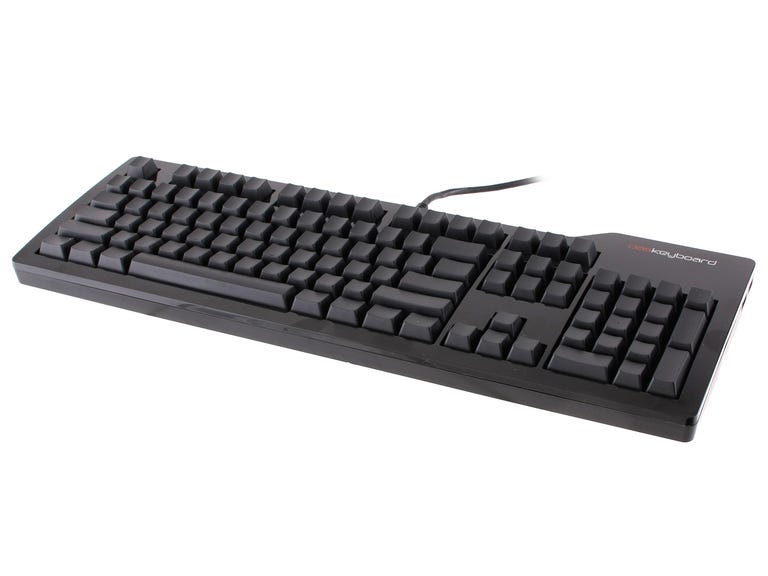
The Model S Ultimate Silent keyboard is aesthetically similar to the Das Professional we reviewed two years ago, with the same glossy black finish and matte keys, although the "Ultimate" removes the key cap labels to give you masochistic bragging rights within certain nerdy circles.
You can also go for the Model S Professional Silent if you really can't do without the markers, but we had little trouble adjusting to the stealth design despite the initial bottleneck with the symbols on top of the number keys. The keyboard's frame is made with a sturdy, durable plastic and at 3 pounds, it's significantly heavier than most keyboards are.
In contrast to "deluxe" keyboards from Logitech and Razer that offer extras like built-in LCD screens, Bluetooth connectivity, and media-controlling keys, the Model S Professional Silent only gives you a pair of USB ports on the top of the right side; the keyboard gets power via its 6.6-foot wired, dual-USB connection. There are also two plastic feet that pop out of the bottom that raise the keys up at an angle, if you prefer. The keyboard connects easily with any Windows, Mac, or Linux computer without the need for external software drivers, and Mac users can swap the Command, Control, and Option keys in the Mac OS keyboard control panel with little hassle.
Despite its minimal set of features, the Model S Ultimate Silent is a truly satisfying experience for the typing connoisseur. Each key cap is perfectly concave to fit a variety of fingers, and just resting your hands on the keys feels like the cozy embrace of a plush La-Z-Boy. We should note that the keys require a longer vertical travel to engage, and those used to the shorter actuation commonly built into laptop keyboards might need more time to adjust. However, based on our experience with the keyboard, we were actually able to type significantly faster and even more accurately using the Model S Ultimate Silent compared with Logitech's Illuminated Keyboard.
The mechanized switches underneath each key provide just the right amount of resistance and springboard action, and we prefer the muted clack of the Silent model to the clickier, more obnoxious sound of the Das Professional. Your co-workers and family members will likely agree, making this model preferable if you plan to use it around others.
Unlike other keyboards in this price range, the Das Professional has no specialized media-control buttons, no separate keys for making macros, and the only LEDs it has are the blue Num and Caps lock indicators. The USB 2.0 ports on the side are a welcome addition. It also boasts a special N-key rollover function with the included PS/2 adapter that lets you press all the keys simultaneously, a feature that gamers will certainly appreciate. Finally, Das Keyboard guarantees all of its keyboards with a one-year warranty that covers defective parts and workmanship that might occur during daily use.