


There's clearly a surfeit of last generation Core ULV processors, as vendors are using the second generation parts to offer lower priced SKUs. We saw it with HP's Envy 6, and now we see it again with Dell's Inspiron 13z.
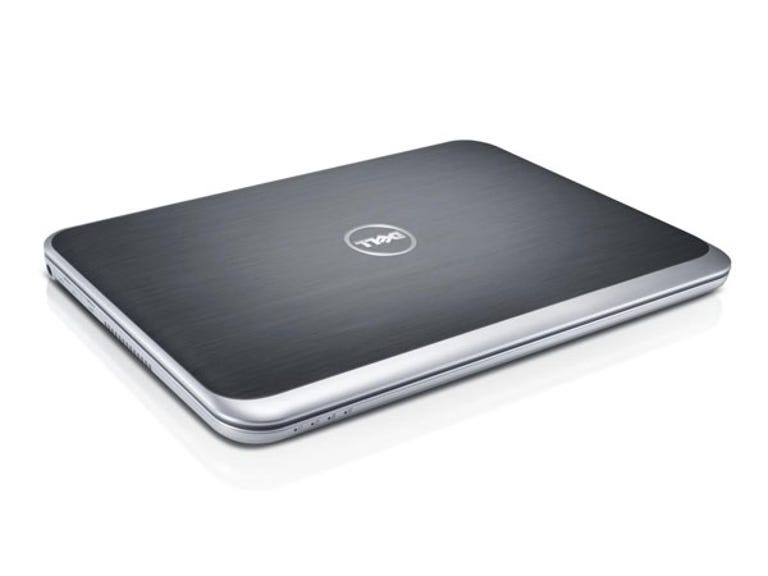
Dell Inspiron 13z (5323)
The Good
The Bad
The Bottom Line
Connectivity
- USB 3.0: 3
- Optical: None
- Video: HDMI
- Ethernet: 100Mbit
- Wireless: Single-channel 802.11n, Bluetooth 4.0
You can get a third generation processor if you're willing to pay for it — at the time of writing, there's three SKUs available — one with a second generation Core processor, and two with third generation. Our particular review sample came with a Core i3 2367M and clocked in at a very modest AU$699.
The laptop itself feels reasonably well built for something that can be generally found for under AU$1000. The industrial design feels a bit toy-like with its huge power buttons, large screen bezel and large radius curves, but nothing truly offends. While the review sample we received had a faux brushed aluminium lid, this can, in theory, be swapped out to any lid you like, courtesy of Dell's Switch program. We say in theory, because at the time of writing Dell, was not offering any lids for sale for the 13z on its website.
Well, except for the port flaps that cover truly every port on the entire machine. We're down on port flaps at the best of times, but these things are heinous — enough to make you grimace every time you need to plug something in. Some flip out, yet are still attached by rubber tags that ensure the cover never gets lost, but also ensure that it always gets in the way; others flip down, but flip immediately back up three quarters of the way, meaning you have to perform some sort of origami jujitsu with your fingers, just to get a USB drive in. Vendors, for the love of all that is holy, port covers are a bad idea.
The amount of ports hidden behind these flaps is slightly above average for the size of the laptop: three USB 3.0, HDMI, 100Mbit Ethernet, a headset jack and an SD card reader.
The screen is a middle-of-the-road TN-based affair, clocking in at 1366x768. It's an LG display, which seems to have better saturation than its Chimei-sourced brother on the Inspiron 14z.
Dell is still persisting with its "Stage" software, the dock and weather portions, in particular, getting in the way of usual Windows 7 operation. One of the things we're hoping Windows 8 will decimate is all the vendor software that simply duplicates already existing Windows functions, but in a different wrapper. While there is a decent whack of crapware here, none of it, apart from Dell Stage, really gets in your face and can be uninstalled quietly and easily.
At the top right, under the screen, there are three hardware buttons: one customisable, one to load laptop settings and one to change the audio profile. We had to install updated audio drivers in order for the audio mode button to do anything. The Dell Audio control panel does help set up custom sound profiles, but the 13z never manages to get beyond sounding like an old FM radio. Bring your headphones.
Application performance
Choose a benchmark: Handbrake | iTunes | Photoshop | Multimedia
Handbrake encoding (in seconds)
- 369Asus ZenBook Prime UX31A (Core i7 3517U, 4GB RAM, 256GB SSD)
- 395Dell XPS 14 (Core i7 3517U, 8GB RAM, 500GB HDD, GeForce GT 630M)
- 398Fujitsu Lifebook U772 (Core i5 3427U, 4GB RAM, 500GB HD + 32GB SSD cache)
- 458Sony Vaio T 11.6 (Core i5 3317U, 8GB RAM, 128GB SSD)
- 491Asus ZenBook UX31 (Core i7 2667M, 4GB RAM, 256GB SSD)
- 535Toshiba Satellite Z830 (Core i5 2467M, 4GB RAM, 128GB SSD)
- 537HP Envy 14 Spectre (Core i5 2467M, 4GB RAM, 128GB SSD)
- 541HP Envy 6 1010TU (Core i5 2467M, 4GB RAM, 500GB HDD)
- 544Acer Aspire S3 (Core i5 2467M, 4GB RAM, 320GB HDD)
- 549Samsung Series 5 Ultra 14-inch (Core i5 2467M, 4GB RAM, 500GB HDD, Radeon HD 7550M)
- 559Asus ZenBook UX21 (Core i7 2667M, 4GB RAM, 128GB SSD)
- 656Samsung Series 5 Ultra 13.3-inch (Core i5 2467, 4GB RAM, 128GB SSD)
(Shorter bars indicate better performance)
iTunes encoding (in seconds)
- 43Asus ZenBook Prime UX31A (Core i7 3517U, 4GB RAM, 256GB SSD)
- 44Dell XPS 14 (Core i7 3517U, 8GB RAM, 500GB HDD, GeForce GT 630M)
- 46Asus ZenBook UX21 (Core i7 2667M, 4GB RAM, 128GB SSD)
- 47Fujitsu Lifebook U772 (Core i5 3427U, 4GB RAM, 500GB HD + 32GB SSD cache)
- 47Asus ZenBook UX31 (Core i7 2667M, 4GB RAM, 256GB SSD)
- 48Sony Vaio T 11.6 (Core i5 3317U, 8GB RAM, 128GB SSD)
- 59HP Folio 13 (Core i5 2467M, 4GB RAM, 128GB SSD)
- 59HP Envy 14 Spectre (Core i5 2467M, 4GB RAM, 128GB SSD)
- 59Toshiba Satellite Z830 (Core i5 2467M, 4GB RAM, 128GB SSD)
- 59Samsung Series 5 Ultra 13.3-inch (Core i5 2467, 4GB RAM, 128GB SSD)
- 61Samsung Series 5 Ultra 14-inch (Core i5 2467M, 4GB RAM, 500GB HDD, Radeon HD 7550M)
- 61HP Envy 6 1010TU (Core i5 2467M, 4GB RAM, 500GB HDD)
- 63Acer Aspire S3 (Core i5 2467M, 4GB RAM, 320GB HDD)
- 87Dell Inspiron 13z 5323 (Core i3 2367, 4GB RAM, 320GB HDD)
- 89Dell Inspiron 14z 5423 (Core i3 2367, 4GB RAM, 500GB HDD + 8GB SSD cache)
(Shorter bars indicate better performance)
Photoshop CS5 benchmark (in seconds)
- 287Asus ZenBook UX21 (Core i7 2667M, 4GB RAM, 128GB SSD)
- 288Asus ZenBook Prime UX31A (Core i7 3517U, 4GB RAM, 256GB SSD)
- 293Dell XPS 14 (Core i7 3517U, 8GB RAM, 500GB HDD, GeForce GT 630M)
- 293Asus ZenBook UX31 (Core i7 2667M, 4GB RAM, 256GB SSD)
- 303Fujitsu Lifebook U772 (Core i5 3427U, 4GB RAM, 500GB HD + 32GB SSD cache)
- 320Sony Vaio T 11.6 (Core i5 3317U, 8GB RAM, 128GB SSD)
- 330Toshiba Satellite Z830 (Core i5 2467M, 4GB RAM, 128GB SSD)
- 332HP Folio 13 (Core i5 2467M, 4GB RAM, 128GB SSD)
- 341Acer Aspire S3 (Core i5 2467M, 4GB RAM, 320GB HDD)
- 341Samsung Series 5 Ultra 13.3-inch (Core i5 2467, 4GB RAM, 128GB SSD)
- 345HP Envy 14 Spectre (Core i5 2467M, 4GB RAM, 128GB SSD)
- 349HP Envy 6 1010TU (Core i5 2467M, 4GB RAM, 500GB HDD)
- 362Samsung Series 5 Ultra 14-inch (Core i5 2467M, 4GB RAM, 500GB HDD, Radeon HD 7550M)
- 423Dell Inspiron 14z 5423 (Core i3 2367, 4GB RAM, 500GB HDD + 8GB SSD cache)
- 435Dell Inspiron 13z 5323 (Core i3 2367, 4GB RAM, 320GB HDD)
(Shorter bars indicate better performance)
Multimedia multitasking test (in seconds)
- 459Dell XPS 14 (Core i7 3517U, 8GB RAM, 500GB HDD, GeForce GT 630M)
- 473Asus ZenBook Prime UX31A (Core i7 3517U, 4GB RAM, 256GB SSD)
- 518Fujitsu Lifebook U772 (Core i5 3427U, 4GB RAM, 500GB HD + 32GB SSD cache)
- 538Sony Vaio T 11.6 (Core i5 3317U, 8GB RAM, 128GB SSD)
- 577Asus ZenBook UX31 (Core i7 2667M, 4GB RAM, 256GB SSD)
- 615Asus ZenBook UX21 (Core i7 2667M, 4GB RAM, 128GB SSD)
- 682Toshiba Satellite Z830 (Core i5 2467M, 4GB RAM, 128GB SSD)
- 686HP Envy 14 Spectre (Core i5 2467M, 4GB RAM, 128GB SSD)
- 693HP Envy 6 1010TU (Core i5 2467M, 4GB RAM, 500GB HDD)
- 719Samsung Series 5 Ultra 14-inch (Core i5 2467M, 4GB RAM, 500GB HDD, Radeon HD 7550M)
- 723Acer Aspire S3 (Core i5 2467M, 4GB RAM, 320GB HDD)
- 837HP Folio 13 (Core i5 2467M, 4GB RAM, 128GB SSD)
- 857Samsung Series 5 Ultra 13.3-inch (Core i5 2467, 4GB RAM, 128GB SSD)
- 1005Dell Inspiron 13z 5323 (Core i3 2367, 4GB RAM, 320GB HDD)
- 1020Dell Inspiron 14z 5423 (Core i3 2367, 4GB RAM, 500GB HDD + 8GB SSD cache)
(Shorter bars indicate better performance)
Technically, the 13z isn't an ultrabook, but it's certainly specced like one. The Core i3 in our review model though, puts it at quite the disadvantage performance-wise, compared to the rest of the pool. Another AU$100 would see a Core i5 3317U inside, which should put it near the Vaio T in performance.
Battery life
Battery life (time)
- Heavy battery test
- Light battery test
- 4h 15m6h 58m
- Dell XPS 14 (Core i7 3517U, 8GB RAM, 500GB HDD, GeForce GT 630M)
- 4h 48m6h 27m
- HP Folio 13 (Core i5 2467M, 4GB RAM, 128GB SSD)
- 3h 34m6h 7m
- HP Envy 14 Spectre (Core i5 2467M, 4GB RAM, 128GB SSD)
- 3h 28m5h 42m
- Fujitsu Lifebook U772 (Core i5 3427U, 4GB RAM, 500GB HD + 32GB SSD cache)
- 3h 7m5h 23m
- Asus ZenBook UX31 (Core i7 2667M, 4GB RAM, 256GB SSD)
- 3h 34m5h 10m
- HP Envy 6 1010TU (Core i5 2467M, 4GB RAM, 500GB HDD)
- 4h 6m5h 8m
- Toshiba Satellite Z830 (Core i5 2467M, 4GB RAM, 128GB SSD)
- 3h 35m4h 52m
- Samsung Series 5 Ultra 13.3-inch (Core i5 2467, 4GB RAM, 128GB SSD)
- 3h 11m4h 41m
- Samsung Series 5 Ultra 14-inch (Core i5 2467M, 4GB RAM, 500GB HDD, Radeon HD 7550M)
- 2h 24m4h 25m
- Sony Vaio T 11.6 (Core i5 3317U, 8GB RAM, 128GB SSD)
- 2h 52m4h 21m
- Asus ZenBook Prime UX31A (Core i7 3517U, 4GB RAM, 256GB SSD)
- 3h 13m4h 7m
- Dell Inspiron 13z 5323 (Core i3 2367, 4GB RAM, 320GB HDD)
- 2h 54m3h 49m
- Dell Inspiron 14z 5423 (Core i3 2367, 4GB RAM, 500GB HDD + 8GB SSD)
- 2h 15m3h 21m
- Asus ZenBook UX21 (Core i7 2667M, 4GB RAM, 128GB SSD)
- 2h 42m2h 54m
- Acer Aspire S3 (Core i5 2467M, 4GB RAM, 320GB HDD)
(Longer bars indicate better performance)
The Inspiron 13z only includes a 4-cell, 49WHr battery, which sees it trip to the bottom of the pack.
Conclusion
In its Core i3 incarnation, the Inspiron 13z nicely slots into the role of throw-about, entry level laptop, perfect for those who really just want to do a bit of web browsing, watch movies and do office-like tasks. This is reflected in its price and performance. If you need more grunt, you can always choose a faster processor, as well — but if this sounds like an appealing path to you, we'd suggesting spending a bit more again to grab something with longer battery life.