


Desktop computers and laptops designed for the family aren't exactly rare, but they generally only offer enough power for web browsing and a spot of video. What if you need more junk in the trunk though?
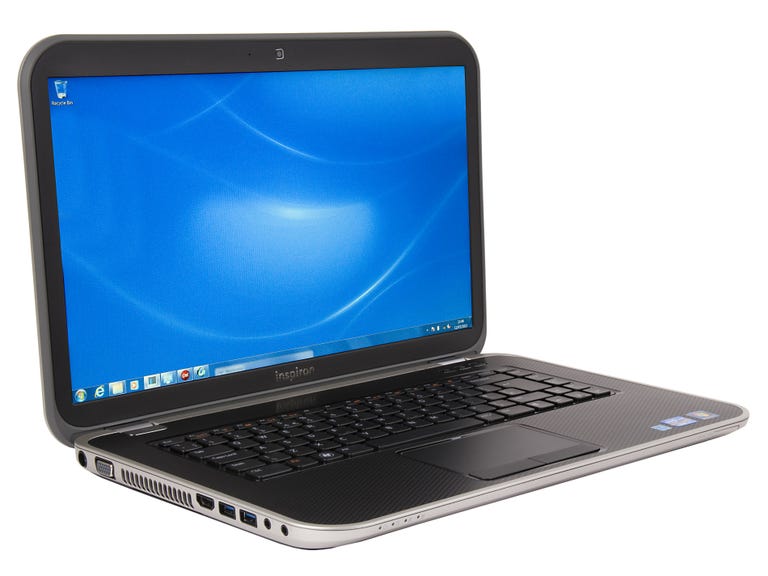
Dell Inspiron 15R Special Edition
The Good
The Bad
The Bottom Line
The Dell Inspiron 15R Special Edition takes the existing 15R laptop and supercharges it, adding the latest Intel Ivy Bridge processor, 8GB of RAM, a Full HD screen and a Blu-ray player.
That configuration -- the top model -- will set you back the fairly reasonable price of £930. As with most of Dell's products, you can choose a range of configurations depending on how deep your pockets are. The 15R starts at £700, for which you'll get a Core i5 processor and 6GB of RAM but you'll be deprived the HD screen and Blu-ray drive.
All models are available to buy from the Dell website now.
Design and build quality
As one of Dell's Inspiron range of laptops, the new 15R is designed for general family use. Dell's therefore not been shaving millimetres off the chassis to try to make it lighter and easier to carry around in a bag.
At 378mm wide, it's fairly chunky for a 15-inch machine and its 34mm height is definitely on the more corpulent side. It's fatter even than some 17-inch gaming machines like the Toshiba Qosmio X870. With a weight of around 2.7kg, I wouldn't recommend you carried it around for too long.

Its best place is at home left on a desk for the parents to get on with some work. The furthest it's likely to travel is the sofa for playing videos or for your kids to chat to their mates on Facebook about the "totally awesome thing Chantelle did in class and OMG can you believe what Libby said about Marie what a total two-faced minger".
Although it probably won't face a tough life on the road, it does at least feel well built enough to take a few hard knocks. The chassis is pretty solid and the lid and wrist rest don't offer much in the way of flex, so I'm confident it will put up with the punishment of the average quarrelling family. Saying that, I don't imagine it would come off too well if you were vacuuming and accidentally caught the power cable, sending it plummeting to the floor.
Like the rest of the Inspiron series, the lid has a removable fascia, the idea being that each family member can have their own colour when they're using it. In practice, it's a little awkward to refit these panels so I really don't think anyone's going to be that fussed about swapping them.
Although you can buy different lids for the Special Edition 15, a black cover with an attractive honeycomb effect comes as standard. This same effect has been mirrored on the inside of the machine so it's not likely to look too appealing if you swapped the dark lid for a swirling bright pink pattern.
The black design provides a slightly more mature look but it's not exactly the prettiest machine. The thick silver edging and wide plastic bezel around the screen is a little reminiscent of the V-Tech laptops you may have had as a kid. If you hope to impress your boss in the next meeting with your professional-looking computer, you might want to check out Dell's slimmer XPS 14Z or the Samsung Series 9.

Around the edges you'll find a generous four USB 3.0 ports, an HDMI port, VGA out, an SD card slot and headphone and microphone jacks. There's also a Blu-ray drive on the high-end model I reviewed although if you opt for the £700 entry-level version you'll only get a DVD drive.
Keyboard and trackpad
If you've spent much time with Dell's laptops before, the keyboard will be instantly familiar. It uses the same rounded, isolated keys found on many of its models like the XPS 14Z. They're well spaced and have a pleasing medium firmness to them, resulting in a comfortable typing experience.
Annoyingly though, while the wrist rest and keyboard surround feel very sturdy, the keyboard tray feels anything but and offers quite a lot of flex when you press down. This can be rather off-putting at times.

The keyboard isn't backlit as standard but you can configure the top-end model to include a backlit variety. That will set you back an extra 30 quid. If you particularly need to be typing in the dark then it might be worth the money. Seeing as the 15R is designed to be used mostly at home, it's unlikely to be a massive issue -- save yourself the cash and just pop a light on if it gets too dark.
The trackpad is a decent size and is fairly responsive too. It uses separate buttons, which reduces the overall area you can swipe your finger around. They are at least comfortable to press, which makes speedy web browsing that much more pleasant.

Screen
The screen measures 15.6 inches on the diagonal. If you've not been able to decide between the more portable 13-inch laptops or the desktop-friendly 17-inch beasts, 15 inches is an excellent compromise.
Better still, it packs a Full HD resolution making it well suited for media use. Most 15-inch laptops tend to offer a lesser 1,600x900-pixel display or even 1,366x768 pixels -- the resolution offered on the lower-end model -- so it's great to see Dell providing 1080p on a display of this size.
The HD screen means you're now perfectly equipped to enjoy the Blu-ray drive shoved in around the side. I loaded up my Blu-ray copy of of The Art of Flight and spent blissful minutes watching snowboarder Travis Rice descend mountains at terrifying speeds. The screen proved fairly bright and adequately bold although I have seen more vivid screens.
It'll certainly do the job for watching a casual movie on the sofa or for looking at Maru's latest exploits on YouTube, but if you want a more cinematic experience then you'll need to hook up your massive TV and sound system using the HDMI port.
The screen has been given a matte coating that helps cut reflections to a minimum. That's particularly handy if you often find yourself working in bright sunlight or harsh office lighting. Reading the fine detail in massive Excel spreadsheets is considerably more comfortable when you're not avoiding staring back at your gawping face.

Performance
It's not just about the movies for the 15R though -- it's packing some extremely spicy components under the hood. Crack it open and you'll find an Intel Core i7-3612QM processor clocked at 2.1GHz, backed by 8GB of RAM.
The processor in use is from Intel's line known as Ivy Bridge, which promises improved built-in graphics performance with lower power usage over its Sandy Bridge predecessors. I've already met Ivy Bridge chips in machines like the Toshiba L875-10G and was very impressed with the performance, so I had high hopes for the 15R.
To see how it stacks up against the competition, I fired up the Geekbench benchmark application and was given a very respectable score of 12,704. By comparison, the Toshiba L875-10G, with its Core i5 processor, achieved 7,669 on the same test. The L875's bigger, badder brother, the X870, provided a more brutal score of 13,538 but it does also demand nearly £800 more. You're really getting excellent performance for the money with the 15R.
In general use, I found it to be extremely competent. It has no trouble tackling standard office tasks, so working your way through big Powerpoint presentations or inputting your quarterly results on a massive Excel spreadsheet will be no issue. It's also good with multi-tasking, being able to run numerous web browser windows with multiple tabs in each and playing back high-definition video.

If you're an extremely heavy multi-tasker or work with a lot of video, you might want to consider the higher RAM on offer with Toshiba's X870, but you're paying a lot more for the convenience. The 15R Special Edition will easily turn its hand to photo retouching -- changing the colour balance or removing red eye on your holiday snaps, for example. And it will be able to string together some video clips from your compact digital camera without too much complaint.
Annoyingly, Dell has loaded a bunch of unhelpful software onto it. Worse still, several programs are designed to launch at start-up, so you're immediately met with a desktop full of weather widgets and quick launch buttons, which you'll probably never need and just slow down the boot-up time. I suggest going on an immediate uninstalling spree when you power it up for the first time -- it will certainly make it quicker in the long run.
There's also an AMD Radeon HD 7730M graphics card slumbering inside that chubby chassis, which should lend a hand with graphics applications as well as letting you play some games. It's unlikely to respond too well if you try and play Crysis 2 on full quality settings but it should tackle less demanding titles like Dirt 3 adequately, so long as you dial the settings back a little.
Conclusion
The Dell Inspiron 15R Special Edition certainly isn't the slimmest or lightest 15-inch laptop you could buy. It is packed to the gills with powerful components though, making it well suited to a family with higher technological demands than basic web browsing. The Full HD screen and Blu-ray drive also make it ideal for movie lovers.