


You may be used to Chromebooks that are small, plasticky and underpowered, but the HP Chromebook 15 is none of those things. In fact, it's more like a higher-end mainstream Windows 10 laptop, but with the simplicity and security of Chrome OS and a price under $470 (£399). If mobility isn't a concern and you're ready to make a Chromebook your primary computer at home, this 15.6-inch HP is an easy recommendation.
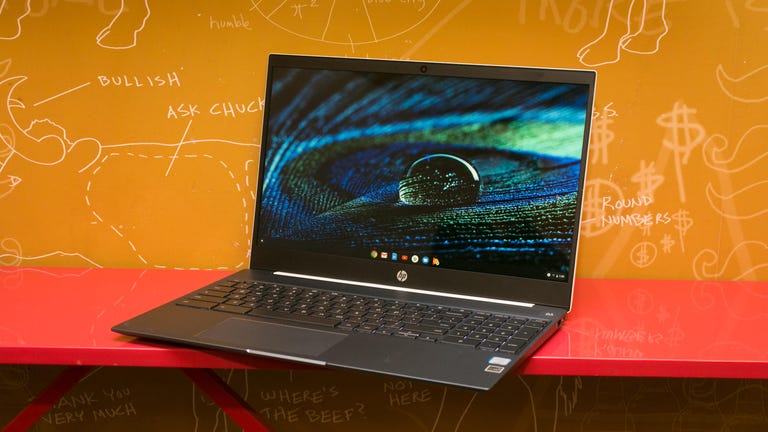
HP Chromebook 15 (2019)
Like
- Good components and features for its sub-$470 price
- Comfortable backlit keyboard with number pad
- Fantastic battery life
Don't like
- Thin-sounding speakers
- High-pitch fan whines under load
At just under 4 pounds (1.8 kg) and about 18mm thick (0.7 inches) it's slim and light enough to travel with, and its metal lid and keyboard deck looks sleek and feels sturdy. Still, it's considerably larger than most of the Chromebooks available today that have screen sizes ranging from 11.6 to 14 inches. That extra real estate not only makes it easier to get work done, but it also makes it more enjoyable for entertainment. And if the full-HD display isn't enough for you, there are USB-C ports (one on each side) that support video out, so you can also connect an external display.
HP Chromebook 15 (15-de0517wm)
| Price as reviewed | $469 |
|---|---|
| Display size/resolution | 15.6-inch 1,920x1,080-pixel touchscreen |
| CPU | 2.2GHz Intel Core i3-8130U |
| Memory | 4GB DDR4-2133MHz (onboard) |
| Graphics | Integrated Intel HD Graphics 620 |
| Storage | 128GB eMMC |
| Networking | 802.11ac wireless, Bluetooth 4.2 |
| Operating system | Chrome OS |
The display is a touchscreen as well, which comes in particularly handy with Android apps available through the Google Play store. The Intel Core i3 processor and integrated graphics gives it enough punch to handle more demanding tasks than web browsing, including mobile gaming. Plus, with 128GB of flash storage and a microSD card slot, you have plenty of room for apps.
When the system is stressed, though, the cooling fans give off a high-pitch whine reminiscent of a vacuum being used in the distance. It's unpleasant. I'd say you should crank up the B&O-tuned stereo speakers to cover it, but they sound pretty thin, so really you're better off popping on some headphones (there's a jack on the left side).
Whatever you do, the battery will last for a good, long time. The HP Chromebook 15 ran for 15 hours, 57 minutes in our streaming video test. With more typical use, it'll get you through a workday and it charges via USB-C so you can plug in from either side, even with an external battery pack.
Speaking of getting work done, both the keyboard and touchpad are solid. Backlit keyboards are rare still on Chromebooks, so it's nice to see one here, and there's a number pad with a Delete key, which you typically don't get on other Chromebooks. The touchpad isn't as smooth as glass touchpads you'd find on premium Windows laptops, but it's still good and responsive.

The Chromebook 15's keyboard is wide and comfortable.
Premium at a lower price
Chromebooks still aren't for everyone. If you need to run Mac or Windows software, it's easier to do it with a laptop running MacOS or Windows 10. But you can do much more with Chrome now, especially with access to Google Assistant, Android apps and Linux support. And if you're all in on Google's web-based apps for email, documents, spreadsheets, presentations and more, then having the HP Chromebook 15 as your primary computer is a solid choice.