
We believe the children are our future. Teach them well, and give them decent, cheap pay-as-you-go phones so they can lead the way when they're not within earshot. The HTC Smart fits the bill, with a good-looking user interface and attractive screen, but it's got some tough competition for your pocket money.
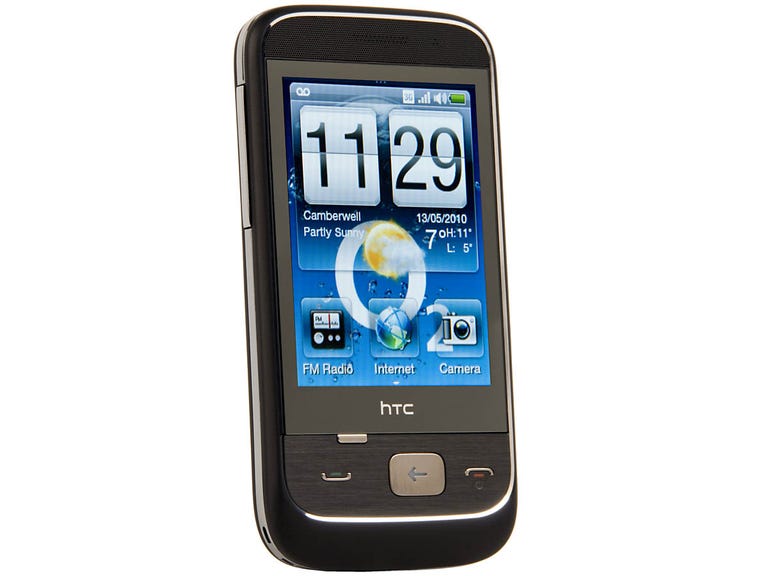
HTC Smart
The Good
The Bad
The Bottom Line
The Smart is available from O2 for £100 on a pay-as-you go deal.It's also free on a £10-per-month, 2-year contract.
Slick Sense
At first glance, the Smart looks like it could be running Android, especially since its operating system is wrapped up in HTC's own Sense userinterface, used on Android phones like the HTC Desire.

That means that you can slide a menu down from the top ofthe screen to see your notifications, such as whether you've received new voicemails. You also have achoice of widgets that you can place on the seven home screens, including theFriend Stream widget that shows live updates from your Facebook and Twitterstream.
Social reject
It looks good, but the Smart is no smart phone. Unsurprisingly, it lacksmany of the features that you'd get on an Android phone, most of which are much more expensive.
We're rabid social-networking fiends, so we want to be ableto easily sync, share and swap our photos and videos. The Smart can share photos over Facebook, as well asemail or SMS, but videos can't be shared with Facebook or YouTube. There's noYouTube app to make watching videos easier, and no way to sync your contactswith your Facebook, Gmail or email provider. At least there's the option to link yourcontacts with their Facebook accounts, once you've added them to your addressbook.
Gunfight at thebudget corral
Thanks to its Sense user interface, the Smart is more user-friendly than many of its budget, touchscreen competitors. The home-screenwidgets are better designed, more attractive, more powerful and easier to usethan the ones on the SamsungGenio Touch, for example -- although the Genio Touch is now almost half theprice of the Smart on a pay-as-you-go tariff.

But the Smart also has to take on budget Android phones likethe T-Mobile Pulse Mini, which can be picked up for around £100 on a pay-as-you-go deal. The shiny, plasticky Pulse doesn't look as solid as theSmart, but it's packed with all the features of Android, including access tothousands of apps in the Android Market.
Cost-cutting compromises
Sacrifices have to be made to keep budget phones in Budgetville. That usually means most cheap touchscreen phones have a resistive screen, rather than a more sensitive capacitive display. The Smart's resistive touchscreen isn't themost sensitive we've ever used, and you'll need to apply some pressure or a fingernail toget it to respond to your swipes. But it's not so bad that you'll need a stylus. It's usable.
The keyboard is good enough too. Despite its smallbuttons, we had no trouble typing without errors. There's an alphanumerickeyboard in portrait mode and a Qwerty keyboard in landscape mode. There's no accelerometer, however, so you have to switch between the two manually.
The buttons on the front are a bastardisation ofthe usual Android buttons. A huge back button takes on the duties of both a backand home button. If you press it quickly, it'll work as a back button. If you hold it down for longer, it'll act as a home key. This could prove confusing, as could the unlabelled settingsbutton that's tucked beneath the screen.
We struggled to use the multi-function button correctly in more complex apps, like theWeb browser, in which a quick press took us back a page or closed the settingsmenu, and a long press took us to the home screen. A dedicated home button would make everything much simpler. On anormal feature phone, we'd expect the red hang-up button to take us back to the home screen, but it locks the phone in the case of the Smart. You'd probably get used to this configurationafter using the Smart every day, but we wish HTC had stuck to convention.
The 71mm (2.8-inch) touchscreen is big enough to use comfortably,especially since the user interface features large, finger-friendly icons. It only has a QVGA resolution, though, so text isn't as sharp as on other phones, and you need to zoom out of most Webpages to fit them on the screen.
But at least you can get online, thanks to a Web browserthat does a decent job of rendering pages correctly. There's a simple scrollbar for zooming in and out of a page. It isn't a patch on the multi-touch zoom functionality that you'd see on a more expensive phone, but it gets the job done in a lessfiddly way than is the case with many budget phones. The Smart also has HSDPA for fast downloads overthe 3G network, although it doesn't have Wi-Fi connectivity.
A perfectly adequate 3-megapixel camera and excellent callquality wrap up the package.
Conclusion
Thanks to its Sense user interface, HTC's Smart looks cleverer than it is. But, as pay-as-you-go touchscreen phones go, the Smart is still one of our favourites,due to its attractive home-screen widgets and big, finger-friendly icons.It's short on some of the social-networking features we crave, but, for a budget phone, it does a good job of surfing the Web.
Price-wise, the Smart is up against some toughcompetition, though. We'd definitely choose it over the cheesy Samsung Diva, but the T-Mobile Pulse Mini packs in more features, and the Nokia 5530XpressMusic opens the door to downloading more music and apps from Nokia'sOvi Store.
Edited by Charles Kloet