
Entering the market at a time when others are contemplating leaving it is a brave move, but INQ is a brave company. The INQ 1 is an innovative phone that pulls together social networking services in a compact slider. Is this the Facebook phone we've all been waiting for? Read on to find out.
iNQ 1
The Good
The Bad
The Bottom Line
The INQ is available on 3 for free on a contract as cheap as £15 per month, or for £80 on pay as you go.
Design
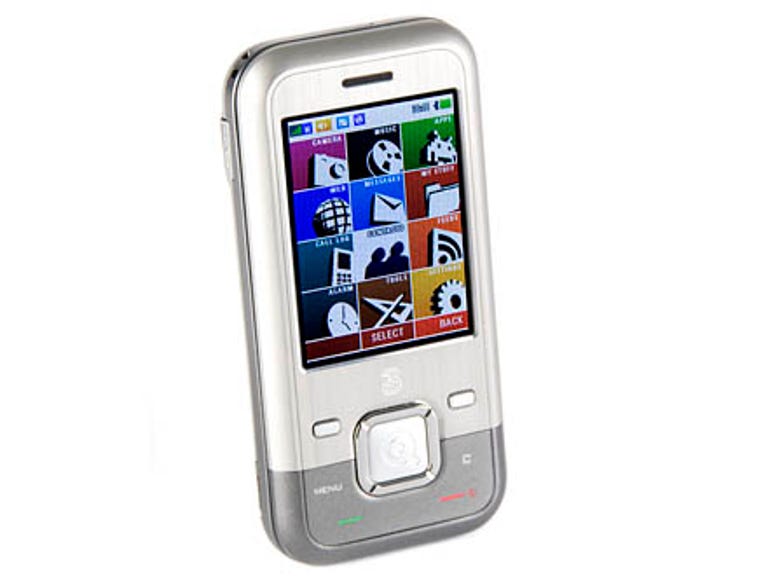
When we first saw the INQ 1 in a picture we didn't think much of it at all. It looked like a bog-standard slider phone, with an extreme pizzazz deficit. In the flesh -- well, plastic and aluminium -- the INQ 1 isn't half bad, however. It's not the most attractive slider out there, but it's functional, well made and sturdy enough to take a few hits.

A medium-sized colour screen displays a bright and sharp picture and all the keys, including those on the keypad, are large and easy to press. The slim casing slips easily into a pocket and there's a mini-USB port for all your charging and syncing needs.
An interesting feature that works well is a small key on the side of the INQ 1 that lets you scroll through the shortcut icons on the main screen. These shortcuts allow you to access apps and services at the click of the button, similar to the Quick Launch feature on Windows Mobile.
We only have two issues with the INQ 1's design: firstly, there's no 3.5mm headphone jack for plugging your headphones straight in; and secondly, given that you're going to be using it to type long emails and messages, we think a full Qwerty keypad -- as on the LG KS360 -- would have been better than the standard numerical one.
Features
It's not often we're excited by a phone as inexpensive as this, but the INQ 1 is much more than your average talker and texter. INQ has created a simple user interface with large, easy-to-understand icons and straightforward option menus. Almost anyone could pick this phone up and start using it.
In addition to a simple user interface, INQ has tightly integrated popular Web services into the INQ 1, in particular Facebook. When you access the FB, it automatically integrates your contact details with your phone contacts, cleverly allowing you to see your friends' profile pictures when they call you.
The Facebook app lets you see your profile wall and gives you access to your photos, contacts and inbox. You can quickly and easily upload pictures straight from the INQ 1 over HSDPA (3.5G). This is by far the best and easiest-to-use Facebook app we've seen.
The INQ 1 also gives you access to Windows Live messenger, so you can IM your friends, and Skype, so you can make VoIP calls. As with Facebook, these apps let you tie in all their contact details with the INQ's contact list.
On your average phone, the contact list merely displays telephone numbers and a few extra details such as email addresses, but the INQ 1's list brilliantly shows you who's online and then lets you contact them via the three Web-based services.
An interesting, useful feature is the ability to add widgets to the INQ 1's start page, allowing you to see a large clock or search Google, for example. These widgets can be customised so that only the most important information is displayed, meaning you don't have to fiddle around in the menu looking for it.
The list of features doesn't end there -- there's a Web browser,although it's more of a WAP browser, displaying pages in quite a clunkyway. We preferred using Opera Mini for our browsing needs, which you can download by visiting mini.opera.com -- it displays full Web pages properly and lets you zoom in and out of them with ease.

A 3.2-megapixel camera on the back of the INQ 1 takes acceptablepictures in daylight, but the lack of flash means shots in low lightdon't come out well at all. There aren't many options, but you canshoot video, set a timer, adjust the size and quality of pics and sharepictures via Bluetooth, email or Facebook, of course.
The INQ 1's music player didn't overwhelm us: it doesn't look greatand is fairly basic, but you can set a playlist and search throughalbums, artists and tracks. It's a real shame there's no 3.5mmheadphone jack and, worse still, there's no adaptor in the box --instead you get a poor pair of headphones with a mini-USB connector.
An interesting feature we stumbled on is that when you plug the INQ1 into a PC, it automatically installs software and pops up a reallysimple interface that lets you connect the PC to the Internet, usingthe INQ 1 as a modem. It's a very simple idea we hope to see on morehandsets in the future.
Performance
Audio quality during calls is good, but we didwant to turn it up a little louder at times. The speakerphone is loudand the headphones were okay, but if you're used to high-endheadphones, be prepared to be disappointed. If using the providedheadphones doesn't do it for you, you can use wireless stereo Bluetoothones.
Battery life is quoted at 324 minutes talktime and 329 hours onstandby. We found that with moderate use, the battery lasted over aday, but of course this figure will vary depending on what features youuse and for how long. If you want to save battery life, cutting down on3G will help, as will turning the screen's brightness down.
Conclusion
The INQ 1 is a diamond in the rough. Okay, it'sa simple phone with a few unusual features, but compared to itscompetitors at this price, it's a real achievement for a company'sfirst phone. Yes, GPS and Wi-Fi would be lovely, but this thing onlycosts £80 and it works like a charm.
If we were going to give INQ any feedback, we'd tell them to keep upthe good work, but please add a full Qwerty keyboard next time -- andpre-install Opera Mini. We'd also like to see a xenon flash on thecamera if possible. Overall, we're very impressed with INQ's firstouting and can't wait for more.
Edited by Nick Hide