
If you can't decide which format to back in the Blu-ray and HD DVD scuffle, then worry no more -- a solution is here called the LG BH100 Super Multi Blue Player, and it plays both high-definition formats. Unfortunately, it'll set you back around £1,000 at the moment.

LG Super Multi Blue BH100
The Good
The Bad
The Bottom Line
Design
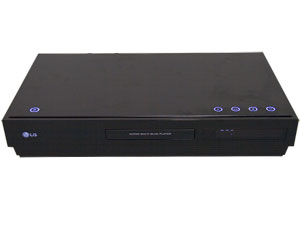
The front panel has a piano-black design and features a disc tray and a small LCD display. The BH100 is quite a bit smaller than competing next-gen players in depth (ie how far back it goes), although it is taller than the Toshiba HD-E1.
At the top of the player, unusually, there are some glowing controls. On the far left is the power button. To the right there are controls for ejecting the disc tray, play/pause, stop and adjusting the display resolution. It's an interesting choice aesthetically, and it's actually easier to use than a normal player as you crouch down to press play, but of course it means you can't stack anything on top of the unit.
To the rear of the player are the connections you would expect on a top-of-the-range player such as this. HDMI is present, though it's only capable of outputting HDMI 1.2, not the superior 1.3. There are also component outputs for older televisions, or screens without HDMI. Audio is well catered-for with analogue 5.1 outputs as well as digital audio out in the form of both coaxial and optical digital. There's also a composite video out, which we sincerely hope you'll never use.
The remote control is fairly large, but it's light and doesn't feel too ungainly. The controls you'll use most, the ones for controlling playback, are in the logical place and you shouldn't struggle to find them with your thumb in a darkened room. The remote has a backlight, but it's only on the five keys that make up the menu direction pad and the enter button, which sits in the middle of the direction keys. This light seems slightly pointless and won't be much help to most people.

Features
The most important feature is the player's ability to cope with both HD DVD and Blu-ray discs.
The player doesn't support HDMI 1.3, which means it can't output uncompressed audio such as DTS HD and Dolby True HD. Instead, these audio formats are down-converted within the player. What you get out of the digital audio outputs will depend on the disc you're playing.
Blu-ray discs will output both DTS HD and Dolby True HD as DTS 5.1 and Dolby Digital 5.1 respectively. When you're playing back an HD DVD disc, DTS HD will output DTS 5.1, but Dolby True HD will only be two-channel PCM audio.
The addition of a 5.1 analogue output is useful, allowing you to hook up the player to your existing 5.1 amplifier.
Performance
To get the best out of the Super Multi Blue we hooked it up to a 1080p television, the Toshiba 37X3030D. We tested a number of discs, recorded on both formats, including our Blu-ray faves Casino Royale and Resident Evil: Apocalypse, and our HD DVD copies of Serenity and Happy Gilmore.
The picture quality was excellent -- overall there were no obvious problems with playback of either format. Happy Gilmore looked as bright and colourful as ever, while the initial black and white scenes of Casino Royalewere moody and grainy, as they were intended to be. Later scenes hadplenty of colour, and fabulous definition. We were particularly blownaway by the sweat pouring down Bond's face after he's poisoned. Serenitylooked similarly stunning -- the star fields and planets were detailedand the impact of the sci-fi movie was conveyed brilliantly.

Standard-definition material can be upscaled by the BH100, althoughthe output is limited to 1080i. Quality was generally very good, but wedid notice the picture didn't look quite as stable as a high-definitionsource. On the plus side, the colour was vibrant and there was plentyof detail in the picture.
Start-up times were also pretty good. We found that with a Blu-raydisc in the drive, we could get a picture on-screen after almostexactly one minute. Curiously, when we tried it with an HD DVD disc,the start-up was slightly quicker at 50 seconds. On our Toshiba HD-E1HD DVD player, we can go from the unit being off, with the disc loaded,to playing in 47 seconds.
We compared the start-up time to a PlayStation 3with a Blu-ray disc in the drive -- the PS3 was quicker by a fewseconds, but by the time you've messed about with the controller andhit play, the time saving is insignificant.
The biggest fault with this player is its lack of support for HDi,which means that none of the advanced features will work on HD DVD.This has a wide impact, and means that even the menus won't displaycorrectly. You'll still be able to access everything on the disc via aspecially designed -- but very basic -- menu. The problem is, accessingspecial features relies on guesswork, because while you can select theextra features, they aren't labelled properly, so you won't be able totell in advance if you're watching a deleted scene, an out-take or abehind-the-scenes featurette.
Conclusion
The picture quality is superb and the ability to play HD DVD and Blu-ray is a fantastic feature.
The main problem is that you can buy a Blu-ray and HD DVD player separately for less money -- indeed, you could get a PS3, an Xbox 360 and an HD DVD add-on drive for the same money.
The lack of proper HD DVD menus is also another major downer, butthe Super Multi Blue is still a big step forward in the world of highdefinition and won't have a major competitor for some time -- Samsung'shybrid player won't arrive until the end of the year.
Edited by Jason Jenkins
Additional editing by Nick Hide