


Nokia isn't foolish enough to think that its line of Internet Tabletsis going to attract everyone. The company has readily admitted that these are for a certain audience -- gadget lovers and early adopters -- and wecertainly agree with that statement. However, with every successivemodel, we also see more appeal in such a device.
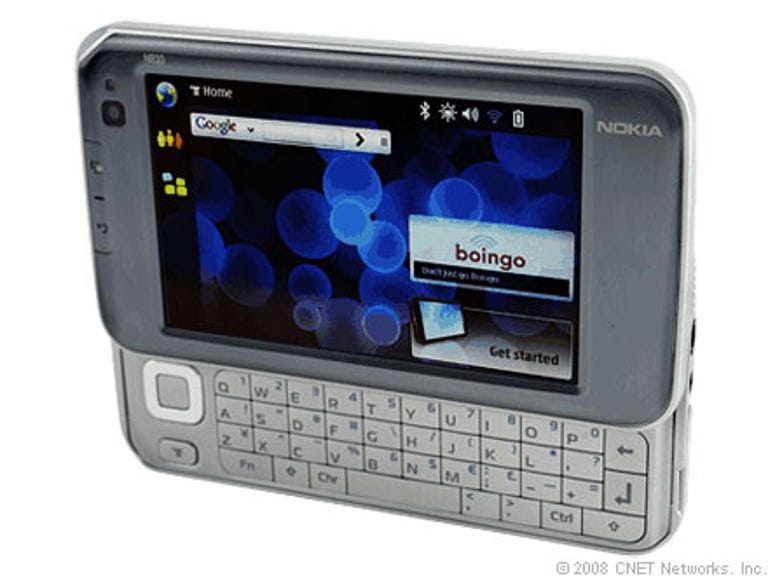
Nokia N810 Internet Tablet
The Good
The Bad
The Bottom Line
Thelatest Internet Tablet, the Nokia N810, features some nice improvements, includinga full Qwerty keyboard and integrated GPS. There's also a more robustWeb browser and improved interface, courtesy of the latest NokiaInternet Tablet 2008 operating system.
The Nokia N810Internet Tablet is available now for £295.
Design
With each iteration of the Internet Tablet, Nokia hasimproved on the design, and the Nokia N810 is noexception. It carries a smaller footprint than the Nokia N800 Internet Tablet at 128 by 14 by 72mm but weighs the same at 226g, which is admittedly on the heavier side. Still, it's compactenough to slip into your bag or purse, and the sleekness combined withbrushed metal finish makes it one sexy device. The N810 is sure togarner a few stares from onlookers.
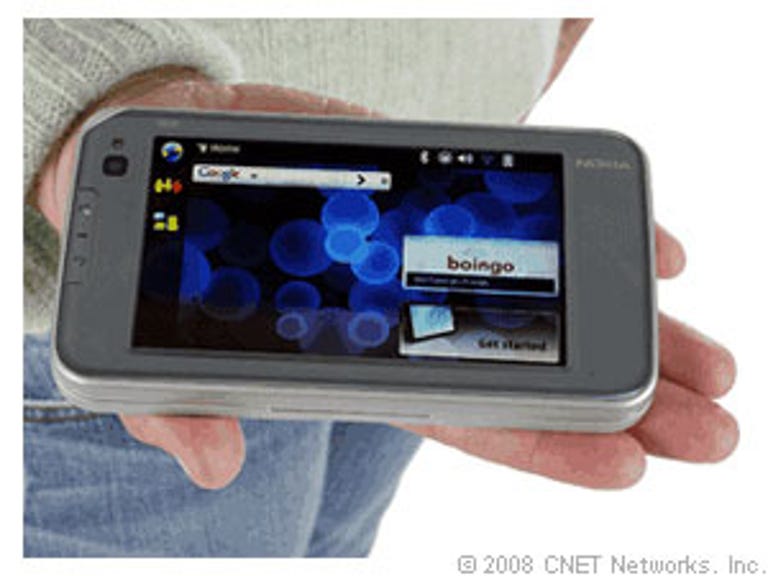
On front, there's a 104mm (4.1-inch) QVGA touchscreen that displays 65,000colours at an 800x480-pixel resolution. It was a pleasurable experiencechecking out Web sites and viewing images, thanks to the sharpdefinition and vibrant colours. It's readable in various lightingconditions, and there's an ambient light sensor that will adjust thescreen's brightness depending on your environment.
The user interfaceis different than the N800, and while it's still not completelyintuitive, it's easier to navigate and the applications are neatlyorganised by category. You can also customise the home screen withvarious themes and background images, and you can conveniently dragitems around the page to create a layout that suits you.
To the left of the display, you'll find the webcam, a Homescreen shortcut, a back button and a status LED. The navigationcontrol pad that was found on the N800 has been relocated (more on this later), but we missed having this on the front of the device to moreeasily operate the device. You can use the included stylus to manoeuvre through the menus and select items. The touchscreen is responsive,though there was some lag but this was more of a performance issuerather than a problem with the touchscreen.

One of the biggest and most noteworthy additions to the Nokia N810is the new slide-out Qwerty keyboard. To access it, just push up thescreen, which locks into place with a satisfying click. While we lovehaving the keyboard since it makes emailing, instant messaging andentering Web addresses easier, we did have a couple of complaints.
Theindividual buttons are fairly large, but there's very little spacingbetween the keys, which makes it cramped. In addition, the toprow is lined closely with the bottom of the front cover, so our thumbsendured a few hits.
The keys are also soft to press and didn't give us the best tactilefeedback. To the left of the keyboard, there is the aforementionednavigation toggle and a menu button. The former is cramped, andif you want to press upward, you're going to run into the same problemof hitting the bottom of the screen with your thumb.

The top of the unit has a key for minimising/maximising the screen,a zoom in and out/volume rocker, a power button, a lock switch and thestylus. Along the right spine, you'll find a 3.5mm headphonejack and power connector, and there are speakers on both sides of thedevice. On the bottom, there's the miniSD card expansion slot and thebattery cover release.
Like the N800, there's a kickstand so you canprop up the N810 on a flat surface, but we found that when we went toput it back, the kickstand would sometimes catch the edge of theexpansion slot cover and pull it open.
Features
The Nokia N810 Internet Tablet is about Internet on the go and touts itself as a Web 2.0-friendlydevice. As with previous models, the N810 relies on Wi-Fi (802.11b/g)technology for connectivity, or you can pair the device with yourBluetooth-enabled phone and use your mobile network.
The includedNokia browser is now based on Mozilla technology with Adobe Flash 9plug-in and Ajax support, for access to all your favorite Web 2.0 siteslike Google Docs, Flickr, Facebook and so forth, plus RSS feeds.
The N810 ships with Nokia's latest Internet Tablet 2008operating system, based on Linux platform Maemo 4.0, and brings some ofthe interface improvements mentioned in the Design section. Built-inapplications and utilities include a file manager, a PDF reader, anotepad, a clock, a calculator and an X Terminal client.
Unfortunately, we're once again disappointed by the lack of PIM tools,such as a calendar, which would go a long way for making the N810 moreversatile and marketable to a broader audience. That said, there areplenty of third-party applications out there, thanks to N810's openplatform.
For email, the N810 supports POP3, IMAP4 and SMTP accounts. Duringinitial setup, a wizard walks you through the steps for accessing youraccount, but we think the process could be easier. There are alsoadvanced settings so that the device automatically retrieves yourmessages on a regular basis, plays a sound when new messages arrive,removes messages older than a specified number of days and so on.There are instant messaging applications preloaded on the handheld,though they're limited at this point to just Google Talk and Jabber.
Voice communication will have to come by way of VoIP calls sincethere's no mobile technology built into the handheld. Once again,Google Talk and Jabber are onboard but now you also have access toSkype and Gizmo. We made a couple of calls using our Skype account, andhad no problems making or receiving calls and chats. Check out thePerformance section for a full report.
A completely new feature to the Nokia N810 is integrated GPS. Thetablet comes with Nokia Maps for coloured maps and points of interest.However, to get any sort of driving directions, you'll have to purchasethe Wayfinder Navigator application, which costs around £75 for a three-yearsubscription. You get a 7-day trial of the service, but in all, itwould have been nice to get this functionality as part of the packagegiven the already expensive price tag.

Last but not least, multimedia. The N810 now ships with Rhapsodysupport, so you can access the service's music catalogue. The built-inmedia player is basic but functional. It supports a number of music andvideo formats, including AAC, MP3, WMA, WAV, AMR, RealAudio, WMV, AVI,3GP, MPEG-4 and others. Whew!
Transferring media to the device is a snap asit's a simple matter of drag and drop. You can also import playlists orcreate them on the fly, and there's a shuffle function. If you'relooking for some fresh tunes, check out the Internet radio. Finally,the Nokia N810 comes with an image viewer (supporting JPEG, TIFF, BMP andother formats) and four preloaded games (Chess, Blocks, Mahjong and Marbles),and you can always download more. All in all, there's 128MB DDR RAM and256MB flash memory, and the miniSD slot can accept up to 8GB cards.
Performance
The Nokia N810 Internet Tablet is equipped with a 400MHz TI OMAP 2420processor, but the handheld still felt a bit underpowered. There wereslight delays when opening various applications and even with simpletasks like exiting out of a program.
Web browsing on the N810 wasexcellent. We visited a number of sites, including CNN, YouTubeand Flickr, and while upload times could go on for a few seconds formore graphic-intensive sites, overall, we enjoyed quick pagerenderings. Moreso, we were impressed that the browsing experience wasmuch like what would you expect on a PC.
Multimedia performance has improved over the N800, mostly inthe video department. Music playback was smooth, but the volume was weaker through the device's speakers and lacked richness and bass.The quality was much better when we plugged in some decent headphones.We watched clips from our personal library and YouTube, and in bothinstances it was a pleasurable experience, thanks to the N810'sbeautiful screen. Pictures and audio were always synchronised withoutany hiccups.
As we briefly mentioned earlier, we had no problems making andreceiving Skype calls or chats. However, the call quality wasn't great. Our callers said it sounded like we were underwater. We hadsimilar results on our end and could barely hear our friends, even withvolume at the highest level.
The N810's GPS capabilities are on par with standalone portablenavigation systems. However, it took the receiver a little while -- 5 to7 minutes -- to get a lock on our position from a cold start.
Onceestablished, though, the N810 accurately tracked our location and held asteady fix as we drove. Wewish we didn't have to pay extra to get driving directions, but we willsay they were accurate and route recalculations were swift. However, the N810'sweak speaker system does make voice prompts difficult to hear.
The Nokia N810's battery is rated for 4 hours of continuous use -- withdisplay and Wi-Fi on -- and up to 14 days of standby time. It also claims10 hours of music playback and up to 5 days of online time. We're stillrunning battery tests and will update this section after we haveresults.
Conclusion
We don't think the N810 is necessarily worthupgrading to from Nokia N800 Internet Tablet(you can download a software update from Nokia to get the latest OS)but if you're making your first foray into the mobile Internet devices,the Nokia N810 is a sleek and Web 2.0-friendly choice.
Additional editing by Shannon Doubleday