
If we were Nokia, we'd be rather annoyed with Samsung,because, with the i8910 HD, it's achieved what Nokia hasn't yet: a desirabletouchscreen phone with the Symbian operating system. The power of Symbian givesthe i8910 its brains, but its spectacular AMOLED screen and touchable userinterface makes it worth having in your pocket.
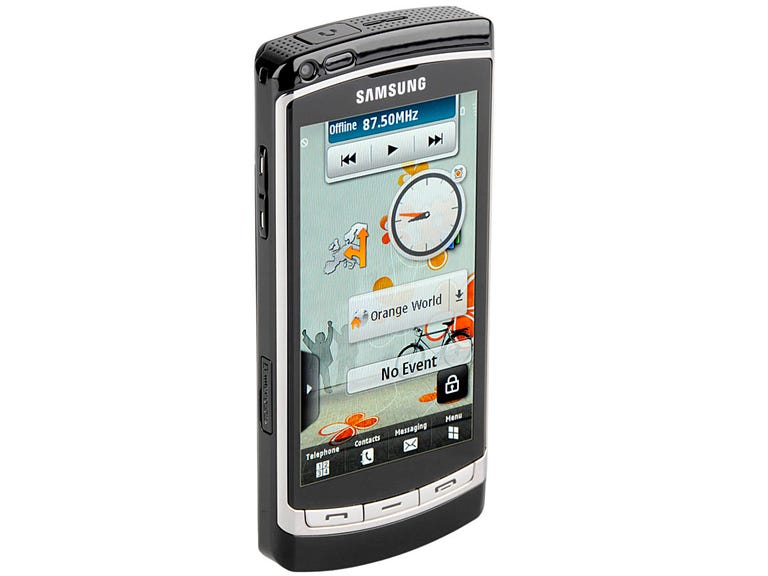
Samsung i8910 HD
The Good
The Bad
The Bottom Line
But all this loveliness doesn't comecheap. You can pick up the i8910 -- formerly the Samsung Omnia HD -- from free on a £30-per-month, two-yearcontract with Orange.
HD and seek
The i8910 is billed as the first phone with high-definition-quality video recording, butthat may be overstating the case somewhat. High definition means more than justgood resolution, and, at 24 frames per second, the i8910 doesn't deliver theframe rate or lack of noise that you'd get from an HD camcorder. In fact,it's nowhere near, but that doesn't mean that its 720p quality doesn't blowevery other mobile phone out of the water. Although the i8910's video is jerkyand noisy compared to a Blu-ray movie, it would be fantastic for uploading yourhigh-quality shenanigans to YouTube.
As for the screen, it too doesn't quite live up to its HDpromise -- it's only got a 640x360-pixel resolution, or half the number of lines normallyconsidered necessary for HD. But that doesn't keep it from being truly spectacular among itsphone peers.
Symbian gets touchy
At first glance, the i8910 looks like it's rocking the same userinterface as the Tocco Ultra,which we liked a great deal. It has a larger version of the spectacular AMOLEDscreen, and the same homescreen with customisable widgets that can show thingslike photos of your contacts or a mini media player. But pop the hood andthere's a major difference -- the i8910 sports the Symbian operating systeminside, and that means this is a fully fledged smart phone.

Samsung hasn't joined the gold rush by opening its own appstore yet, but you can download new apps from Orange. But, without something like Nokia'snew OviStore, Symbian is slightly tricky when it comes to installing things, withconfusing messages popping up all over the place.
Our i8910 had good applications included, however, so you may notbother downloading anything. For example, there's a search app that searchesfor anything on the phone, such as contacts, messages and music files. There'salso Quickoffice, for editing Word, Excel and PowerPoint files.
The i8910supports background processes, so you can keep the Web browser window openwhile you go off and write a text message, for example. But all this multitasking can lead to a very sluggishphone, if you tend to bounce around without closing things down.
We had tospend an annoying few minutes tidying things up, or restarting, when things startedto go wrong. We found it easy to see what applications were running from theoptions menu, but didn't like how things such as the homescreen, which isalways running, are shown on the list. If we can't turn it off, we just don'tsee the point of cluttering things up.
And that's just one example of the ways in which the i8910 stillfalls short of the usability bar set by the iPhone.There's very restricted multitasking on the iPhone, and it's missing keyfeatures like copy and paste, but the i8910's flexibility and power comes at aprice. The user interface is more complicated and less intuitive, and performanceslowed down when we pushed the phone to its limits.
Tapping and typing
The i8910's glossy black plastic body, trimmed with a chrome edge, andtouchscreen goodness can't help but prompt comparisons with the iPhone. But itsreal peer is Nokia's touchscreen phones, such as the N97,which runs the same powerful Symbian smart-phone operating system.
In thatbattle, the i8910 comes out as the clear winner. It's biggest strengths are itscapacitive touchscreen, which is much more responsive and pleasant to use than the N97's resistive touchscreen, andthe graphic design which makes Symbian a desirable, touchable system instead ofa bland workhorse left over from a keyboard past, as is the case with the N97.
One area where Samsung's effortdoes suffer is with the widgets on the homescreen. Like the N97, the i8910 hasa customisable homescreen, on which you can drag and drop widgets for things likecontacts. But the N97's widgets show live updates from services like Facebook,or live news feeds. The i8910's widgets are more basic and won't give you liveupdates.
The i8910 offers three on-screen text-input choices: an alphanumeric keyboard in portrait or landscape screenorientation, a Qwerty keyboard in landscape only, or handwriting recognition.We found the keys larger than average for a touchscreen phone and easy to useat top speed, with no delay. The predictive text worked well in thealphanumeric keyboard mode, but there's no predictive text when using theQwerty keyboard. We really missed this feature, which makes fast, error-free typingsignificantly easier on a soft keyboard.
Megapixel megastar
The back of the i8910 sports the large lens of an 8-megapixel camera, withan LED photo light. We were impressed by the photo quality, even without theLED light in low light conditions. But the LED light proved way too harsh insome shots, wiping out detail. Shutter lag is moderate, with about a secondand a half between pressing the button and taking a photo. But looking atphotos could sometimes be a slow process, as the photo viewer took a second or two toload the 8-megapixel image.

There's plenty of room for the bigimages and videos thanks to the 8GB or 16GB of internal memory, and there's room for up to32GB more in the microSD memory card slot. You can also pack that space full ofmusic. The i8910 supports heaps of formats, including MP3, AAC and WMA. You canlisten to music on your own headphones too, thanks to the standard 3.5mm headphone jack. Ifit's all too much effort, there's also a good old-fashioned FM radio to keepyou entertained.
Connect the dots
Getting more tunes, videos or applications onto the phone is made easy bythe fact that Samsung has adopted the Symbian PC Suite software, familiar froma generation of Nokia phones, wholesale. It's too bad that taking up Symbian meansSamsung had to ditch its PC Studio software, which was innovative andwell-designed. PC Suite tends to do a solid job of transferring data, but it'sPC only, so Mac users are left out in the cold.
You won't necessarily need aUSB cable to get connected, thanks to built-in Wi-Fi, 5.76Mbps HSUPA and 7.2MbpsHSDPA. There's also GPS to keep you on track, but you'll have to install GoogleMaps yourself -- it wasn't included on our handset.
With so much going on, we wereimpressed with the i8910's battery life. It kept on trucking through a wholeday of testing without breaking a sweat.
Conclusion
The Samsung i8910 HD shows Nokia how to make a fun, usable,attractive touchscreen phone sporting the Symbian S60 operating system. Withoutthe Ovi Store, it won't be as easy to get apps onto this phone as it is with the N97,but that downside is far outweighed by the i8910's gorgeous 94mm (3.7-inch) AMOLEDscreen and responsive capacitive touchscreen. The i8910's support formultitasking occasionally makes it sluggish, but that's a trade-off you may bewilling to make in exchange for the ability to keep so many balls in the air.
That great screen, huge memory ofup to 48GB, 3.5mm headphone jack and support for a wide range of file formatsmake the i8910 an excellent entertainment phone. And, with unmatched videorecording and speedy upload speeds, you can keep everyoneelse entertained with your own movies too.
Edited by Nick Hide and Charles Kloet