


How much does 0.7 of an inch matter? Apparently a lot, if you're talking laptops.
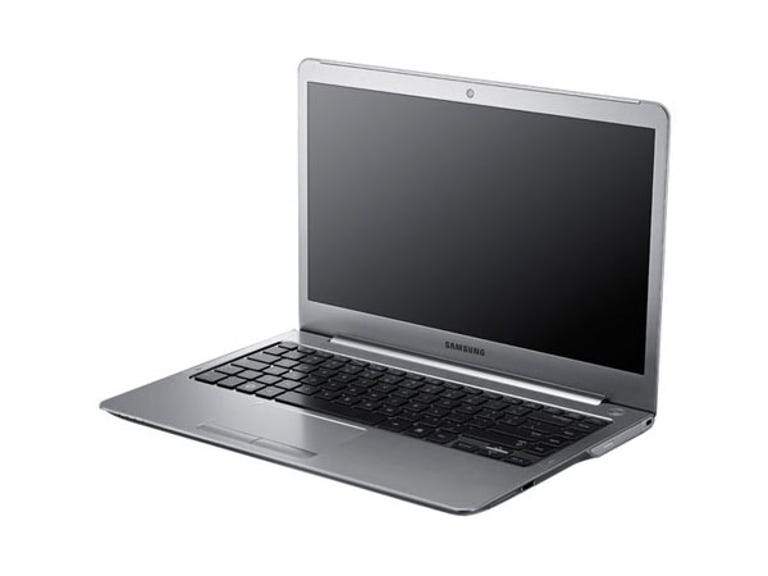
Samsung Series 5 Ultra 14-inch
The Good
The Bad
The Bottom Line
This is Samsung's 14-inch version of its Series 5 Ultra, something that at first blush might seem a little weird in the face of its 13.3-inch brother. It quickly becomes apparent, though, that this is more mainstream focused than its slimmed-down sibling, the extra space affording it an optical drive, a full-sized VGA port and a Radeon HD 7550M. Just don't confuse this discrete graphics with being capable of modern games; it's nothing of the sort. Still, should you need a little 3D-accelerated grunt, it's got your back.
Connectivity
- USB 3.0: 2
- USB 2.0: 2
- Video: VGA, HDMI
- Ethernet: gigabit
- Wireless: dual-band 802.11n, Bluetooth 3.0
We quite liked the smaller Ultra, and this one steps in time with it; a dark-grey interior, a matte 1366x768 screen and surprisingly capable speakers. We'd hoped for a little bit more, audio-wise, for the 14-inch version, but the volume is still nothing to sneeze at. For proper tone, though, you'll still want to break out your headphones.
You also get the same Core i5 2467M processor and 4GB of RAM, but the 128GB SSD has fallen by the wayside and been replaced with a 500GB HDD, paired with a 16GB SSD from SanDisk as a cache drive. All of these extra components mean more weight, and the 14-inch Ultra tips the scales at 1.79kg, an extra 400g on top of the 13.3-inch version. It doesn't sound like much, but it adds up over time.
Flip the laptop over, and you'll find that Samsung has designed things so a single door gives access to both the hard drive and the RAM. While the first 4GB is soldered to the motherboard, there's an extra slot free, should you wish to expand, and the 2.5-inch hard drive will give you access to higher capacities than the typical mSATA drives.
Application performance
Choose a benchmark: Handbrake | iTunes | Photoshop | Multimedia
Handbrake encoding (in seconds)
- 491Asus ZenBook UX31 (Core i7 2667M, 4GB RAM, 256GB SSD)
- 535Toshiba Satellite Z830 (Core i5 2467M, 4GB RAM, 128GB SSD)
- 537HP Envy 14 Spectre (Core i5 2467M, 4GB RAM, 128GB SSD)
- 544Acer Aspire S3 (Core i5 2467M, 4GB RAM, 320GB HDD)
- 549Samsung Series 5 Ultra 14-inch (Core i5 2467M, 4GB RAM, 500GB HDD, Radeon HD 7550M)
- 559Asus ZenBook UX21 (Core i7 2667M, 4GB RAM, 128GB SSD)
- 656Samsung Series 5 Ultra 13.3-inch (Core i5 2467, 4GB RAM, 128GB SSD)
(Shorter bars indicate better performance)
iTunes encoding (in seconds)
- 46Asus ZenBook UX21 (Core i7 2667M, 4GB RAM, 128GB SSD)
- 47Asus ZenBook UX31 (Core i7 2667M, 4GB RAM, 256GB SSD)
- 59HP Folio 13 (Core i5 2467M, 4GB RAM, 128GB SSD)
- 59HP Envy 14 Spectre (Core i5 2467M, 4GB RAM, 128GB SSD)
- 59Toshiba Satellite Z830 (Core i5 2467M, 4GB RAM, 128GB SSD)
- 59Samsung Series 5 Ultra 13.3-inch (Core i5 2467, 4GB RAM, 128GB SSD)
- 61Samsung Series 5 Ultra 14-inch (Core i5 2467M, 4GB RAM, 500GB HDD, Radeon HD 7550M)
- 63Acer Aspire S3 (Core i5 2467M, 4GB RAM, 320GB HDD)
(Shorter bars indicate better performance)
Photoshop CS5 benchmark (in seconds)
- 287Asus ZenBook UX21 (Core i7 2667M, 4GB RAM, 128GB SSD)
- 293Asus ZenBook UX31 (Core i7 2667M, 4GB RAM, 256GB SSD)
- 330Toshiba Satellite Z830 (Core i5 2467M, 4GB RAM, 128GB SSD)
- 332HP Folio 13 (Core i5 2467M, 4GB RAM, 128GB SSD)
- 341Acer Aspire S3 (Core i5 2467M, 4GB RAM, 320GB HDD)
- 341Samsung Series 5 Ultra 13.3-inch (Core i5 2467, 4GB RAM, 128GB SSD)
- 345HP Envy 14 Spectre (Core i5 2467M, 4GB RAM, 128GB SSD)
- 362Samsung Series 5 Ultra 14-inch (Core i5 2467M, 4GB RAM, 500GB HDD, Radeon HD 7550M)
(Shorter bars indicate better performance)
Multimedia multitasking test (in seconds)
- 577Asus ZenBook UX31 (Core i7 2667M, 4GB RAM, 256GB SSD)
- 615Asus ZenBook UX21 (Core i7 2667M, 4GB RAM, 128GB SSD)
- 682Toshiba Satellite Z830 (Core i5 2467M, 4GB RAM, 128GB SSD)
- 686HP Envy 14 Spectre (Core i5 2467M, 4GB RAM, 128GB SSD)
- 719Samsung Series 5 Ultra 14-inch (Core i5 2467M, 4GB RAM, 500GB HDD, Radeon HD 7550M)
- 723Acer Aspire S3 (Core i5 2467M, 4GB RAM, 320GB HDD)
- 837HP Folio 13 (Core i5 2467M, 4GB RAM, 128GB SSD)
- 857Samsung Series 5 Ultra 13.3-inch (Core i5 2467, 4GB RAM, 128GB SSD)
(Shorter bars indicate better performance)
Our application benchmarks continue to throw up interesting differences when configurations change within the ultrabook confines. One thing to note is that it doesn't suffer the overheating issue that the 13.3-inch laptop does when it comes to really taxing the CPU with Handbrake, with the CPU left to do the best that it possibly can. The Photoshop test is an odd one, and we wish we could explain what led to such a performance deficit — but subsequent retests returned the same result.
Gaming performance
Choose a benchmark: Metro 2033 | Batman: Arkham Asylum
Metro 2033 (in FPS)
- Max FPS
- Average FPS
- Min FPS
- 39185HP Pavilion dv6 (Core i5 2450M, 4GB RAM, 500GB HDD, Radeon HD 7690M XT)
- 48112Asus N53SV (Core i7 2630QM, 6GB RAM, 640GB HDD, GeForce GT 540M)
- 2592Samsung Series 5 Ultra 14-inch (Core i5 2467M, 4GB RAM, 500GB HDD, Radeon HD 7550M)
- 3072Asus A53S (Core i5 2430M, 4GB RAM, 750GB HDD, GeForce GT 520MX) http://salezone.website/asus-a53sk53sc-339335105.htm%3Cli%3E1330http://www.cnet.com.au/asus-a53sk53sc-339335105.htm%3Cspan section="shortcodeLink">Toshiba Satellite C665 (Core i5 2430M, 4GB RAM, 500GB HDD, GeForce 315M)
http://salezone.website/asus-a53sk53sc-339335105.htm%3C/p%3E%3Cp%3E%28Longer bars indicate better performance)
http://salezone.website/asus-a53sk53sc-339335105.htmhttp://www.cnet.com.au/asus-a53sk53sc-339335105.htm%3C/p%3E%3Ch3%3EBatman: Arkham Asylum (in FPS)
- Max FPS
- Average FPS
- Min FPS
http://salezone.website/asus-a53sk53sc-339335105.htm%3C/p%3E%3Cul%3Ehttp://www.cnet.com.au/asus-a53sk53sc-339335105.htm%3Cli%3E875733http://www.cnet.com.au/asus-a53sk53sc-339335105.htm%3Cspan section="shortcodeLink">HP Pavilion dv6 (Core i5 2450M, 4GB RAM, 500GB HDD, Radeon HD 7690M XT)
(Longer bars indicate better performance)
Performance-wise, the Radeon HD 7550 feels right at home amongst budget laptops. While it's not surprising that it can't manage a consistently playable frame rate in Metro 2033, the more forgiving Batman: Arkham Asylum also doesn't provide a smooth experience. Despite the discrete graphics card, this shouldn't be considered a gaming machine.
Battery life
http://salezone.website/asus-a53sk53sc-339335105.htm%3C/p%3E%3Ch3%3EBattery life (time)
- Heavy battery test
- Light battery test
http://salezone.website/asus-a53sk53sc-339335105.htm%3C/p%3E%3Cul%3E%3Cli%3E4h 48m6h 27m
(Longer bars indicate better performance)
As can be expected with a heavier hardware load, the 14-inch laptop lasted less time than the 13.3-inch version. It's still a decent showing for what is the only ultrabook with discrete graphics in our charts, but you will get more longevity out of other brands.
Conclusion
If you miss the trappings of a normal laptop — optical drive, large-capacity hard drives, discrete graphics — but want to get in on the ultrabook rush, then the Series 5 Ultra 14-inch will do you well.