


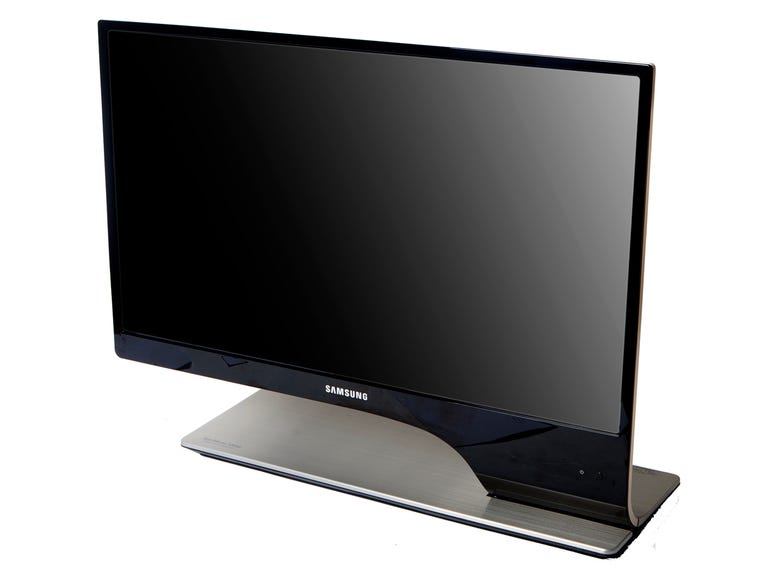
Samsung SyncMaster T27A950
The Good
The Bad
The Bottom Line

At two points earlier this year I got a chance to see the Samsung SyncMaster T27A950 under controlled conditions. Each time the monitor wowed me with its glossy presentation of movies with deep blacks, brilliant color, and a seemingly very high contrast. Controlled demos are one thing, though, and how a device performs in labs tests under a much more discriminating eye can be something else.
Design and features
The design of the 27-inch Samsung SyncMaster T27A950 can be described in just one word: gorgeous and unique. OK, that's two words--or three, if you must be absolutely literal--but in this case one word just isn't enough.

The 27-inch screen sits atop a wide, flat base stand that nearly spans the length of the panel. The panel itself measures 24.5 inches wide and the foot stand is 20.3 inches wide by 7.3 inches in depth. The screen attaches to the right side of the foot stand and the distance from the bottom of the screen to the desktop is 3.6 inches. The razor-thin bezel measures 0.4 inch wide on the sides, making it one of the thinnest monitor bezels we've seen. Also, measuring just 0.25 inch in depth, the panel is incredibly thin, especially for a 27-incher, and is one of the thinnest panels we've yet seen.
The design allows about 20 degrees of back tilt, but no other ergonomic options. The metallic chrome look (it's actually plastic) of the back panel accentuates the monitor's smooth finish, with no ports, connections, or VESA screw holes on it to ruin the aesthetic; however, there is a serial number sticker right smack in the bottom middle that ruins an otherwise pristine look.
The base stand accepts the burden of connections, and on its back are two USB ports, a coaxial in, PC audio in and out, an optical audio port, and a connection for the included composite/component dongle. All face the back and are easy to access.
Unfortunately, no DVI port is included, but Samsung attempts to make up for this by supplying two HDMI ports instead. As an added bonus, each HDMI port can be switched to video or graphics optimization through the onscreen display (OSD).

The T27A950 comes with a very comprehensive-looking remote control that gives you much easier access to the OSD's functions than the actual OSD array does. Aside from its inclusion of Smart Hub, the OSD has several features Samsung HDTV owners are accustomed to. Brightness, contrast, backlight control, and sharpness controls are available from picture options. You'll also have access to RGB gain and offset settings as well as many other detailed picture settings. Sound options ran from equalization settings to auto volume to 3D sound for the built-in speakers. Noticing a trend? We're definitely seeing a new high-water mark in design here.

Smart Hub provides streaming video, games, and apps, including Netflix, Hulu, Facebook, and Twitter, among many others. Also, you can stream video from any AllShare-enabled device, like a Samsung smartphone, directly to the T27A950. Thanks to the monitor's Ethernet port and built-in CPU, this can all be done without the aid of a computer connected to the display. Connection to a wireless router can be achieved through the use of a Samsung USB wireless adapter, but no native Wi-Fi is included.
The version of Smart Hub here looks to be very close to the one Samsung has included in its HDTVs for a while now. Check out our full review of Smart Hub for more info. In our experience, Smart Hub was easy to navigate; apps downloaded quickly and installed themselves without any trouble. Unfortunately, we were unable to get Netflix to activate on the monitor.
Included with the T27A950 is a pair of wireless, Samsung-proprietary, active-shutter 3D glasses. The glasses fit comfortably on the face, but there is a huge gap at the top between the glasses and your forehead where lots of light can come through.

Samsung's 3D glasses have a slightly different shutter pattern than Nvidia's offerings, which results in the shutter being fully open more often than the Nvidia counterpart.
According to Samsung, the shutter lens is open 70 percent of the time, whereas Nvidia's--or "Company N", as its press materials refer to it--is open only 32 percent of the time. This purportedly results in a longer battery life for the glasses and less strain on the eye, due to more ambient light being allowed in.
The monitor's overall build quality is high, with a foot stand that won't budge no matter the force with which we punched it, but while the foot stand feels nice and heavy, the panel, when squeezed, was more malleable than we'd like.