
The Samsung Wave 2 is the sharpest-looking dumb phone on the market.But, despite its good looks and straightforward user interface, it still makes us pine forthe app-sharing community of similarly priced Androidphones.
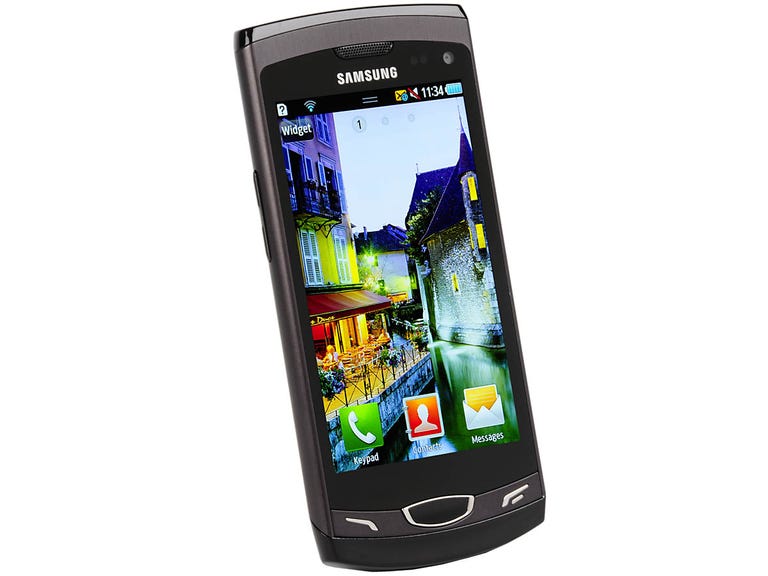
Samsung Wave 2 GT-S8530
The Good
The Bad
The Bottom Line
The Wave 2 is available now for free on a £20-per-month contract.You can also pick it up for around £280 SIM-free. Note that the Wave 2 isalso known as the Wave II or GT-S8530.
New Wave
We raved about the good looks of the first Wave, and we're happy to report that the Wave 2 is also solidly built andattractive. The diamond-shaped home button on the original phone now has afatter, more thumb-friendly, rounded shape, and the screen has beenpumped up from 3.2 to 3.7 inches. Otherwise, though, the two phones look like identical twins.
The rear of the Wave 2's sleek case twinkles with diamond-shaped holes for thecamera lens and LED light. But, other than those playful decorations, thephone looks sleek, minimalist and high-quality. Even the snappy catch on the back coverscreams quality -- and it actually makes the cover much easier to take off than that of most other phones.
Bada up
Overall, the Wave 2's software isn't quite as slick as its hardware. But Samsung's Bada operating system is straightforward anddoes a good job of imitating some smart-phone features. For example, the Wave 2 has three home screens, which you can fill up with live widgets that do everything from displaying your Facebook updates to showing you the news. It's easy to add widgets to the home screenby tapping a button in the corner of the screen.
The Wave 2's simplicity shouldappeal to people who aren't interested in getting stuck into a morecomplex smart phone, such as an Android device. But there's only abasic selection of widgets pre-loaded on the phone, and they don'talways make the best use of the screen space. The BBC widget, forexample, consists of two large buttons that link to the BBC news andsports websites, and a tiny text area that's barely big enough todisplay one headline. Happily, it's possible to download more widgetsfrom the Samsung Apps store.
The app store is slowly but surely filling up with programs andgames, but it's more like a corner shop than a supermarket. If you'rekeen to start playing with apps, we suggest buying an Androidphone instead. In this price range, it probably won't look as good as theWave 2, but the selection of apps is huge and there are far morepeople in the Android community to share appsuggestions with. The iPhoneApp Store is even bigger than the Android Market, but that phone costs a heap more than theWave 2.
If you're not hugely bothered about apps but still want the basics, the Wave 2 might suffice, offering a few simple built-in apps. For example, Facebook and Twitter clients are pre-installed, and you can add your various email accounts, too.But we wish the phone came with a few more media treats, like various wallpapers. We couldn't show off the gorgeousAMOLED screen at its best until we'd loaded our own videos onto thephone.
The Wave 2 has a speedy 1GHz processor, which seems tohelp apps launch quickly. But the software doesn't feel polishedenough to capitalise on the chip's speed. For instance, transitions between the portrait and landscape modes are sluggish, and scrolling isn't always smooth.
Hide and surf
The decent browser on the Wave 2 will let you surf the Web withouttoo much trouble, but we do have some complaints. The address baralong the top helpfully moves out of the way while you're browsing,but it reappears every time you touch the screen. Not only is thisannoying, but the bar also covers the top of the page you're looking at, so you can'tsee or use the navigation area at the top of most websites untilthe bar is hidden again.
The browser also provides a good example of how the user interface can be confused and laborious in places. Just trying to search a Web page will see you tapping the screen like a woodpecker with a nasty espresso addiction. When you've finally got to the point where you can perform a search, you'll be presented with two on-screen buttons -- 'search' and 'done'. The done button isn't very accurately labelled, since pressing it actually cancels the search. This is just confusing.
The T9 Trace on-screen keyboard also shows up some software quirks. It works in the same way as the Swype appon Android devices, and we love how quickly you can type on it. Butit's not used everywhere in the interface -- it's missing in the browser, for example. That makes filling out Web forms slower than it ought tobe, and it's annoying to have to figure out which kind of keyboard you're using each time you have to type something.
The browser on the Wave 2 isn't a disaster. It displays Web pagesquickly and accurately, so it has the basics down pat. But these littleannoyances reveal how the software on the Wave 2 isn't quite up toscratch in places.
We have to mention another flaw in the user interface too. Accustomed as we are to reading from left to right, we found it flummoxing to have the 'cancel' button displayed on the right and the 'next' button on the left, throughout the interface.
Moving pictures
Photos captured by the Wave 2's5-megapixel camera are of average quality. But the camera's 720phigh-definition video is much better. Even in low light, our moviemasterpieces looked clear and bright. Photos are so yesterday,anyway.
With 2GB of built-in memory, we didn't even have to pop in a memorycard before we could start filming. To get your films off the phone, you can connect itto your computer with a USB cable, upload them straight to YouTube, orplay them on your telly wirelessly, courtesy of DNLA streaming technology.
Conclusion
The Samsung Wave 2 has plenty of positive points, from its gorgeous screento its solid, handsome case. But its modest software suffers from a fewirritating quirks. If you're after apps and games, you could snap up anAndroid phone, like the Samsung Galaxy Ace, for roughly the same price. The Ace offers more features and afar better selection of apps. You'll also have the support of a community of helpful Android users. Still, ifyou're looking for a phone that covers the basics and isn't toocomplicated, the Wave 2 delivers with style.
Edited by Charles Kloet