


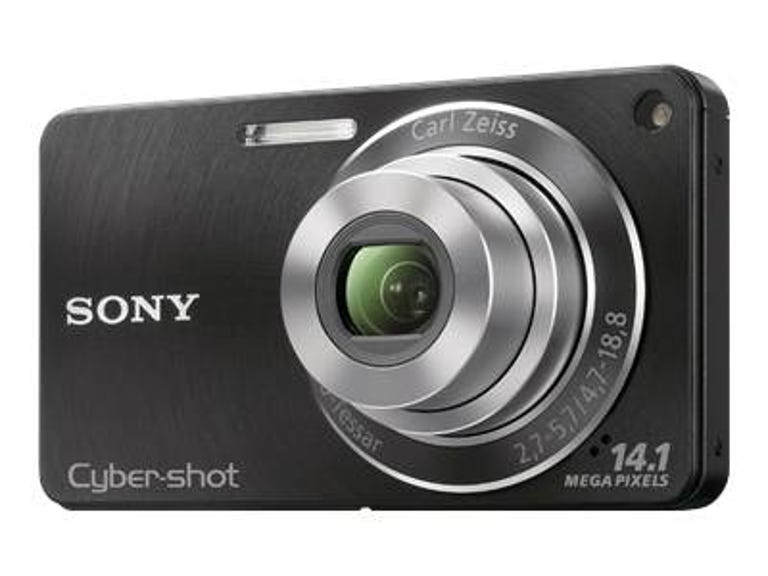
The point-and-shoot competition at and around $200 is fierce. The Sony Cyber-shot DSC-W350 brings a small, solid package at that price with a nice 26mm-equivalent wide-angle f2.7 lens, a 4x zoom with optical image stabilization, 2.7-inch LCD, and an HD movie mode. Plus, it's small and attractive and has reliable options ideal for snapshooters. Shooting performance is mixed, but good where it counts, and photo quality is very good if you're able to grasp the limitations of a 14-megapixel compact camera; if you can overlook some noise and softened details, photos are even usable at ISO 800 and 1,600. However, those expecting more than a very good snapshot experience at this price should keep shopping.
The Good
The Bad
The Bottom Line
| Key specs | Sony Cyber-shot DSC-W350 |
| Price (MSRP) | $199.99 |
| Dimensions (WHD) | 3.6 x 2.1 x 0.7 inches |
| Weight (with battery and media) | 4 ounces |
| Megapixels, image sensor size, type | 14 megapixels, 1/2.3-inch CCD |
| LCD size, resolution/viewfinder | 2.7-inch LCD, 230K dots/None |
| Lens (zoom, aperture, focal length) | 4x, f2.7-4.7, 26-105mm (35mm equivalent) |
| File format (still/video) | JPEG/MPEG-4 (.MP4) |
| Highest resolution size (still/video) | 4,320x3,240 pixels/ 1,280x720 at 30fps |
| Image stabilization type | Optical and digital |
| Battery type, CIPA rated life | Lithium ion rechargeable, 240 shots |
| Battery charged in camera | No, external charger supplied |
| Storage media | Memory Stick Pro Duo, SD, SDHC |
| Bundled software | Picture Motion Browser 5.0 (Windows), PMB Portable 1.1 (Windows, Mac) |
The W350 is available in silver, black, blue, and pink versions; its body is lightweight and compact enough to squeeze in most pants pockets or handbags. The front is metal with micro concentric ridges adding a slight texture that improves grip. Those who have hesitated to purchase Sony cameras because of the reliance on Memory Stick media will be pleased that the 2010 Cyber-shots accept SD and SDHC cards. The slot and battery compartment are protected by a lockable door, which you'll have to open regularly to remove the battery for charging. Though internal memory is limited, it does host a small piece of software for quickly uploading photos and movies to sharing sites when the camera is connected to a Windows or Mac computer.
Controls are straightforward. On top are the power and shutter release buttons. They're flush with the body and, though they're easily pressed, they'll require most users to look to locate them. The remaining controls are on back to the right of the reasonably bright, but not great LCD. A zoom rocker that some may find finicky sits above the thumbrest; on the right edge of the body sits a vertical slider for moving from shooting stills to panoramas to movies. Playback, Menu, Delete, and a circular directional pad handle all other tasks. In addition to navigating menus, the directional pad can change flash and timer functions, change display information, and activate smile detection. Sony's menu systems remain fairly logical and uncomplicated compared with its cameras prior to 2009's interface changes.
| General shooting options | Sony Cyber-shot DSC-W350 |
| ISO sensitivity (full resolution) | Auto, 80, 100, 200, 400, 800, 1,600, 3,200 |
| White balance | Auto, Daylight, Cloudy, Fluorescent white, Fluorescent natural white, Fluorescent day white, Incandescent, Flash, Underwater 1, 2, and Custom, Custom |
| Recording modes | Easy, Intelligent Auto, Program, Sweep Panorama, Scene, Movie |
| Focus modes | Multi AF, Center AF, Spot AF, Face Detection (Adult, Child) |
| Metering modes | Multi, Center-weighted average, Spot |
| Color effects | None |
| Burst mode shot limit (full resolution) | Up to 100 photos |
If I wasn't already clear about this, the W350 is well-suited for snapshot photography and should not be considered for those who like to fiddle a lot with settings. That's not to say this Sony doesn't give you some control; the Program Auto lets you adjust ISO, white balance, autofocus points, light metering, and exposure values as well as control the amount of Sony's Dynamic Range Optimization used for rescuing shadow detail. The Intelligent Auto scene recognition mode turns out reliable results without any adjustments, but there are still a couple options available to you like exposure and setting face detection priorities. An Easy mode takes away all options except for image size (large or small) and enlarges onscreen text. There are 10 scene shooting options including Beach, Snow, Food, Pet, and Underwater for use with an add-on housing. There's a version of Sony's Sweep Panorama feature, too, that allows you to quickly and easily take panoramic shots horizontally or vertically. Though fun, the results just aren't as good as those taken with Sony's Exmor R-based models like the WX1 and TX1. Consider them for Web use only or very small prints. Lastly, the Movie mode records at resolutions up to 720p HD with a mono mic for audio and use of the optical zoom while recording.
Shooting performance is mixed for the W350, but at least its shutter lag is below average. In bright conditions, the time from pressing the shutter release to capture is 0.4 second. In low-light conditions the lag only goes up to 0.7 second. The camera is also pretty quick with continuous shooting for its class at 1.9 frames per second. From power on to first shot is an OK 1.9 seconds, too. But the wait between shots is sort of long: 3.1 seconds without the flash and 3.9 seconds with. These times are still that of a midrange point-and-shoot, though, making it best suited for portraits and landscapes and not moving subjects.

The photo quality from the W350 is very good for a sub-$200 camera, but not without its issues. The camera is capable of consistently fine-quality snapshots, particularly outdoors in daylight. Sensitivities go from ISO 80 up to ISO 3,200, but usability for prints more than 8x10 inches drops off at ISO 200. This is because even at ISO 80, photos viewed at full size have noise to them that only gets more pronounced as sensitivities get higher. Add to that the watery effect of Sony's noise suppression and you end up with pictures that appear soft and painterly. If you're planning to make prints larger than 4x6 inches, just keep the ISO as low as possible. However, if you're OK with some noise in exchange for getting a shot, photos up to ISO 1,600 can be usable for small prints or for online use, as long as you're not doing a lot of cropping.
And speaking of cropping, ideally a 14-megapixel resolution should buy you a fair amount of room for cutting down your images. However, the W350's photos are generally soft and lacking in fine detail when viewed at full size with the exception of those taken in macro. If you're one to crop in a lot on subjects and then want to create 13x19-inch prints, you probably won't be happy with this camera (or any other current sub-$200 compact, really). Also, despite the camera creating 45x60-inch photos, Sony only recommends prints up to 13x19 inches for the W350.
As for the wide-angle lens, Sony keeps the barrel distortion in check and there's no sign of pincushioning at the long end of the zoom, either. The amount of purple fringing is normal for a camera in its class. Center sharpness is fairly good on the W350, but subjects off to the sides are noticeably softer.
Colors are bright and natural and reasonably accurate, though blues seem to be a bit pumped up. Exposure is generally good, leaning toward underexposed, but highlights are prone to clipping.
Video quality was good, too, on par with a pocket video camera and again you do get use of the 4x zoom while you're recording. Unfortunately, if you want to view HD movies and photos directly from the camera on an HDTV, you'll need to pony up for a proprietary component cable that connects to the multiuse terminal on the camera's bottom.
The Sony Cyber-shot DSC-W350 is a great little snapshot camera. It has just enough features to justify its price along with a good-looking design and uncomplicated operation. As is the case with most models in its class, the W350 is at its best in bright conditions for portraits and landscapes. And regardless of the resolution stamped on its body, the photos will generally not be great viewed at their full size from a foot away on your computer screen. They will, however, make fine prints at 8x10 inches or smaller, and look good viewed on a TV from a proper distance or on your favorite photo-sharing site.
(Shorter bars indicate better performance)
 | Time to first shot | | Typical shot-to-shot time (flash) | | Typical shot-to-shot time | | Shutter lag (dim) | | Shutter lag (typical) |
(Longer bars indicate better performance)
Find out more about how we test digital cameras.