


Sony is selling the Vaio Duo 11 as being the best of both worlds: a full-HD laptop and touch-screen tablet in one. And it is both of those things -- sort of.
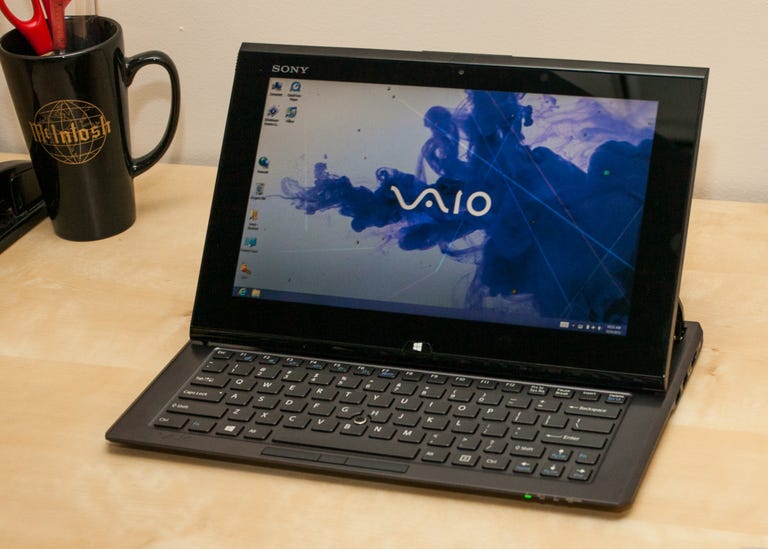
Sony Vaio Duo 11
The Good
The Bad
The Bottom Line
It does have a full-HD 11.6-inch display. The display is a touch screen. The Duo can be used as a tablet and, thanks to Sony's Surf Slider design, the screen can be lifted and slid back to reveal a keyboard. It's the "best" part we object to, because while it sounds cool, the design is disappointing for several reasons.
Outside of the design, the rest of the Duo -- components, performance, battery life, Windows 8 usability -- all adds up to a good tablet/computer. But we expect there will be many more convertible tablets like the Duo coming soon, so you may just want to take a wait-and-see approach with this category for the time being.
Design
No one we showed the Duo 11 to was impressed with the design. The idea, yes; everyone was in agreement that a device that works as a full Windows 8 laptop and a tablet is solid. But the Duo isn't it and comes off as a tablet cobbled together with a makeshift keyboard.
Used as a tablet, the screen -- while really nice and responsive -- is a little too big to hold comfortably, so it's best used on your lap or on a table. Certainly not the end of the world, but if you're looking for a tablet to use while walking around, you'll definitely want to lay hands on a Duo to try out before you buy.

The real disappointment comes when you slide back the display, though. First, if you hand it to someone who's never opened it, they can't figure out how. And even if they do know how, it's not terribly easy. You need to lift up on the display from the back, but there's nothing really to pull up with and if you're not paying attention, it's all too easy to attempt to lift from the wrong side and potentially rip the screen off its hinges.
With the display up, you'll see a keyboard that looks not unlike the type made for an Apple iPad. However, because of the wide-screen display and the need to counterbalance it when up, the keyboard is wide and slim, resulting in some very small keys. Unless you're a very accurate typist, it's probably going to take a lot of practice to type efficiently on it. At least it's backlit.

There's no touch pad, but instead there's an optical pointer. It's a little touch-sensitive nub between the G and H keys along with three mouse buttons at the bottom below the spacebar. Not having a touch pad mainly proved a problem when using the traditional Windows Desktop interface, since the Windows 8-style interface is designed more for touch-screen use. In other words, for one interface the Duo is great, for the other, not so much.
Sony includes a digitizer stylus, which can be used instead of the nub or for writing and drawing on the screen with certain applications, including a note-taking app called Note Anytime and the excellent ArtRage Studio Pro. The problem with using the stylus instead of a touch pad is that you have to keep picking it up and putting it down. Also, when you're not using it, there is no place on the body of the Duo to stash it.

Lastly, the screen support mechanism itself is a bit of an issue for me. From the side, you can see two ribbon cables coming up from the body of the keyboard section to the display. You can also see its hinges and springs, the inside of the plastic back panel, and, well, it just generally looks unfinished. Plus, there's no adjustment of the screen angle, which makes some sense because the keyboard section has to balance the screen when upright. It also means, though, that if it's not at a good angle for how you're seated or your lighting, you're out of luck.
Features
On the inside, the Duo 11's main components aren't different from those of other ultrabooks we've tested, including a third-gen Core i5 processor, 6GB of memory, and a 128GB solid-state drive (SSD). The display, on the other hand, is.