


Sony's late entrant to the ultrabook race is very much a Vaio in terms of design language. That is, it has a solid plastic construction that tends to look slightly metallic, island keys, Assist, Web and Vaio buttons at the top right (which load Vaio Care, default web browser and either Media Gallery or PlayMemories), and a glowing green power button. It also feels dated, and, for an ultrabook, chunky.
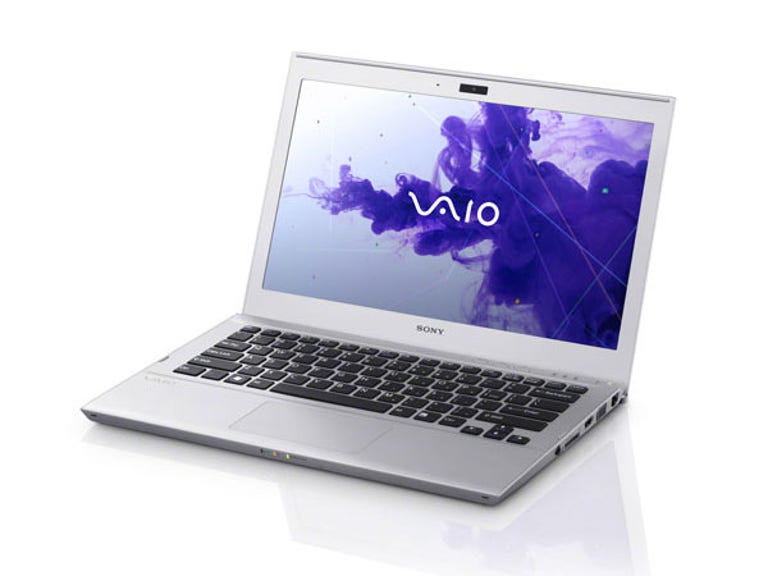
Sony Vaio T 11.6-inch (SVT11115FGS)
The Good
The Bad
The Bottom Line
There are two major variants for the Series T Vaios — 11.6 inches and 13.3 inches, with a few options within each category, denoted by a string of letters and numbers that's far too easy to forget.
Connectivity
- USB 3.0: 1
- USB 2.0: 1
- Optical: None
- Video: HDMI, VGA
- Ethernet: Gigabit
- Wireless: Single-channel 802.11n, Bluetooth 4.0
The variant in front of us today, the SVT11115FGS (rolls off the tongue, doesn't it?), has an 11.6-inch screen, a Core i5 3317U processor, 4GB of RAM and a 128GB Toshiba SSD. There are signs that Sony got into this game late; most notably the single USB 2.0 and USB 3.0 ports, when most competitors are now refreshing to at least dual USB 3.0. The screen sits, postage-stamp style, inside of a comparatively huge bezel, making it feel smaller than it is.
It's not a good screen, either; vertical viewing angles in particular are problematic, with bright colours very quickly blowing out to white, and you're left feeling as if you're never really looking at it from the optimal angle.
There's a full-sized SD card slot paired with mandatory Sony tie-in Memory Stick Pro Duo, a VGA port, an HDMI port and a very welcome, full-sized gigabit Ethernet jack. There's a headphone jack, but, like many ultrabooks, don't expect room for your external microphone.
The Synaptics touch pad is decent to use, and for whatever reason Sony has a version of its drivers that allows gestures for simultaneous double- and triple-finger tapping, which can be used to set to things like right-click and middle-click. While double tapping worked perfectly, triple tapping was completely ignored — a driver update is clearly required to fix the issue.
Sony's keyboard isn't backlit and does have a shorter throw than usual. It's not as bad as Fujitsu's Lifebook U772 and you do eventually adjust, but it can still be off-putting even after hours of use.
Application performance
Choose a benchmark: Handbrake | iTunes | Photoshop | Multimedia
Handbrake encoding (in seconds)
- 369Asus ZenBook Prime UX31A (Core i7 3517U, 4GB RAM, 256GB SSD)
- 395Dell XPS 14 (Core i7 3517U, 8GB RAM, 500GB HDD, GeForce GT 630M)
- 398Fujitsu Lifebook U772 (Core i5 3427U, 4GB RAM, 500GB HD + 32GB SSD cache)
- 458Sony Vaio T 11.6 (Core i5 3317U, 8GB RAM, 128GB SSD)
- 491Asus ZenBook UX31 (Core i7 2667M, 4GB RAM, 256GB SSD)
- 535Toshiba Satellite Z830 (Core i5 2467M, 4GB RAM, 128GB SSD)
- 537HP Envy 14 Spectre (Core i5 2467M, 4GB RAM, 128GB SSD)
- 544Acer Aspire S3 (Core i5 2467M, 4GB RAM, 320GB HDD)
- 549Samsung Series 5 Ultra 14-inch (Core i5 2467M, 4GB RAM, 500GB HDD, Radeon HD 7550M)
- 559Asus ZenBook UX21 (Core i7 2667M, 4GB RAM, 128GB SSD)
- 656Samsung Series 5 Ultra 13.3-inch (Core i5 2467, 4GB RAM, 128GB SSD)
(Shorter bars indicate better performance)
iTunes encoding (in seconds)
- 43Asus ZenBook Prime UX31A (Core i7 3517U, 4GB RAM, 256GB SSD)
- 44Dell XPS 14 (Core i7 3517U, 8GB RAM, 500GB HDD, GeForce GT 630M)
- 46Asus ZenBook UX21 (Core i7 2667M, 4GB RAM, 128GB SSD)
- 47Fujitsu Lifebook U772 (Core i5 3427U, 4GB RAM, 500GB HD + 32GB SSD cache)
- 47Asus ZenBook UX31 (Core i7 2667M, 4GB RAM, 256GB SSD)
- 48Sony Vaio T 11.6 (Core i5 3317U, 8GB RAM, 128GB SSD)
- 59HP Folio 13 (Core i5 2467M, 4GB RAM, 128GB SSD)
- 59HP Envy 14 Spectre (Core i5 2467M, 4GB RAM, 128GB SSD)
- 59Toshiba Satellite Z830 (Core i5 2467M, 4GB RAM, 128GB SSD)
- 59Samsung Series 5 Ultra 13.3-inch (Core i5 2467, 4GB RAM, 128GB SSD)
- 61Samsung Series 5 Ultra 14-inch (Core i5 2467M, 4GB RAM, 500GB HDD, Radeon HD 7550M)
- 63Acer Aspire S3 (Core i5 2467M, 4GB RAM, 320GB HDD)
(Shorter bars indicate better performance)
Photoshop CS5 benchmark (in seconds)
- 287Asus ZenBook UX21 (Core i7 2667M, 4GB RAM, 128GB SSD)
- 288Asus ZenBook Prime UX31A (Core i7 3517U, 4GB RAM, 256GB SSD)
- 293Dell XPS 14 (Core i7 3517U, 8GB RAM, 500GB HDD, GeForce GT 630M)
- 293Asus ZenBook UX31 (Core i7 2667M, 4GB RAM, 256GB SSD)
- 303Fujitsu Lifebook U772 (Core i5 3427U, 4GB RAM, 500GB HD + 32GB SSD cache)
- 320Sony Vaio T 11.6 (Core i5 3317U, 8GB RAM, 128GB SSD)
- 330Toshiba Satellite Z830 (Core i5 2467M, 4GB RAM, 128GB SSD)
- 332HP Folio 13 (Core i5 2467M, 4GB RAM, 128GB SSD)
- 341Acer Aspire S3 (Core i5 2467M, 4GB RAM, 320GB HDD)
- 341Samsung Series 5 Ultra 13.3-inch (Core i5 2467, 4GB RAM, 128GB SSD)
- 345HP Envy 14 Spectre (Core i5 2467M, 4GB RAM, 128GB SSD)
- 362Samsung Series 5 Ultra 14-inch (Core i5 2467M, 4GB RAM, 500GB HDD, Radeon HD 7550M)
(Shorter bars indicate better performance)
Multimedia multitasking test (in seconds)
- 459Dell XPS 14 (Core i7 3517U, 8GB RAM, 500GB HDD, GeForce GT 630M)
- 473Asus ZenBook Prime UX31A (Core i7 3517U, 4GB RAM, 256GB SSD)
- 518Fujitsu Lifebook U772 (Core i5 3427U, 4GB RAM, 500GB HD + 32GB SSD cache)
- 538Sony Vaio T 11.6 (Core i5 3317U, 8GB RAM, 128GB SSD)
- 577Asus ZenBook UX31 (Core i7 2667M, 4GB RAM, 256GB SSD)
- 615Asus ZenBook UX21 (Core i7 2667M, 4GB RAM, 128GB SSD)
- 682Toshiba Satellite Z830 (Core i5 2467M, 4GB RAM, 128GB SSD)
- 686HP Envy 14 Spectre (Core i5 2467M, 4GB RAM, 128GB SSD)
- 719Samsung Series 5 Ultra 14-inch (Core i5 2467M, 4GB RAM, 500GB HDD, Radeon HD 7550M)
- 723Acer Aspire S3 (Core i5 2467M, 4GB RAM, 320GB HDD)
- 837HP Folio 13 (Core i5 2467M, 4GB RAM, 128GB SSD)
- 857Samsung Series 5 Ultra 13.3-inch (Core i5 2467, 4GB RAM, 128GB SSD)
(Shorter bars indicate better performance)
Under heavy load, the fan definitely makes itself known — but it does so without the accompanying whine that Fujitsu's U772 has. It also has a tendency to spin up quite a bit under idle conditions, something that puzzled us a little. Performance-wise there's nothing spectacular here; the Core i5 performs just where it should.
Battery life
Battery life (time)
- Heavy battery test
- Light battery test
- 4h 15m6h 58m
- Dell XPS 14 (Core i7 3517U, 8GB RAM, 500GB HDD, GeForce GT 630M)
- 4h 48m6h 27m
- HP Folio 13 (Core i5 2467M, 4GB RAM, 128GB SSD)
- 3h 34m6h 7m
- HP Envy 14 Spectre (Core i5 2467M, 4GB RAM, 128GB SSD)
- 3h 28m5h 42m
- Fujitsu Lifebook U772 (Core i5 3427U, 4GB RAM, 500GB HD + 32GB SSD cache)
- 3h 7m5h 23m
- Asus ZenBook UX31 (Core i7 2667M, 4GB RAM, 256GB SSD)
- 4h 6m5h 8m
- Toshiba Satellite Z830 (Core i5 2467M, 4GB RAM, 128GB SSD)
- 3h 35m4h 52m
- Samsung Series 5 Ultra 13.3-inch (Core i5 2467, 4GB RAM, 128GB SSD)
- 3h 11m4h 41m
- Samsung Series 5 Ultra 14-inch (Core i5 2467M, 4GB RAM, 500GB HDD, Radeon HD 7550M)
- 2h 24m4h 25m
- Sony Vaio T 11.6 (Core i5 3317U, 8GB RAM, 128GB SSD)
- 2h 52m4h 21m
- Asus ZenBook Prime UX31A (Core i7 3517U, 4GB RAM, 256GB SSD)
- 2h 15m3h 21m
- Asus ZenBook UX21 (Core i7 2667M, 4GB RAM, 128GB SSD)
- 2h 42m2h 54m
- Acer Aspire S3 (Core i5 2467M, 4GB RAM, 320GB HDD)
(Longer bars indicate better performance)
A smaller laptop means decreased space for the battery, but the Vaio only just edges out the much more powerful, full HD + IPS, larger UX31A. We hoped for better.
Conclusion
The Vaio T is a decent if uninspiring little laptop. The vertical viewing angles on the screen are a major concern, and Sony has disadvantaged itself by only including a single USB 3.0 port and single-channel wireless.