
It may only have been a 1080i player, but the Toshiba HD-E1 found a place in our hearts. Firstly, despite the fact that it's 1080i, it makes no difference when you watch film material. Secondly, it's cheap and simple.
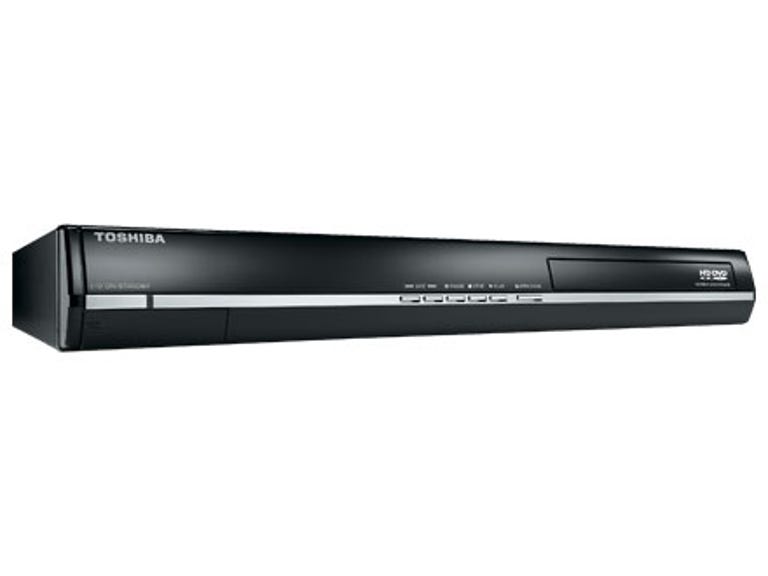
Toshiba HD-EP30
The Good
The Bad
The Bottom Line
Its technical successor, the Toshiba HD-EP30, has much to live up to. It has to be a low cost, high quality way to see HD DVDs. Can this £200 new model succeed like its predecessor? We have high hopes.
Design
The EP30 doesn't look particularly different to the E1, but there are some subtle differences. The EP30 has smoother, more modern edges, whereas the E1 looked boxy and retro. The EP30 is the other way round to the E1 with the disc tray on the opposite side. We aren't sure why Toshiba has swapped them over. It might be something to do with the inner workings, but whatever the reason, it makes no difference to the machine.
The remote control has been reworked, too. The EP30 has a much smaller, ligher controller. The size reduction is possibly because Toshiba has decided to remove the TV control keys. This sounds like a shame, but we'd wager most people never even bother programming these things to control their TV anyway, so it's not much of a problem.
To the back of the EP30 there's one slight modification -- the S-Video socket has been removed. Now the only standard definition output is the composite video. To be honest, we'd rather they dropped the composite and left S-Video on, but as they are both standard definition, it's not a big deal.
Everything else is the same. Of course, there is an HDMI socket and an Ethernet connection for hooking the player up to the Internet for extra interactivity. Analogue component outputs are also available.
Physically, the EP30 is smaller than the E1. It's slightly less tall and isn't quite as deep. You'll also notice that the front flap has now gone, revealing playback control buttons on the front of the machine.
Features
The major advantage of the EP30 over the E1 is the addition of 1080p playback. The EP30 also supports 24p out of the box, via an option that is selectable in the picture settings menu.
The EP30 has the now trademark Toshiba HD DVD menu system. It's clear and easy to use. There are a couple of things we've had problems with in the past, such as updating the firmware of the players behind an ADSL router. The E1 refused to cooperate in these circumstances, but Toshiba will send an update disc out in the post though, should this affect you.
The EP30 has the same basic network configuration, although you'll need to enable DHCP and DNS to get it working properly. Once you do, you'll get the added option of seeing extras on HD DVD downloaded from the Internet.
Performance
We loved the high definition performance of the EP30. Connecting it toa Philips 1080p TV showed us how awesome HD DVD can look at fullresolution. We put in our HD DVD copy of The Matrix,from our trilogy box set. The detail in faces and accurate colours wereexcellent. The Matrix had the green shading that is intended to remindus what's happening in the computer program and what takes place in thereal world.
Upscaled DVD was impressive too, with our Mission: Impossible II disc showing up plenty of detail. There was one thing we did notice, however -- using the 1080p/24 mode on M:I-IIcaused the picture to stutter. Switching back to just 1080p cleared itup though, so worse case scenario, you'll have to go into the menu andadjust this by hand. Perhaps a future firmware update will solve thisproblem.
Sound on the EP30 depends entirely on what you connect it to.We used the internal TV speakers and were very pleased with the clarityof the sound. To get the best out of the high definition sound on HDDVD you'll need to connect it to an AV receiver that can handle DTS orDolby True HD.
The EP30 can output DTS HD (core only, up to 6.1 channels),Dolby True HD and Dolby Digital Plus. Because the HDMI socket supportsversion 1.3 of the standard, you'll be able to send all these glorioushigh-quality soundtracks to a suitable equipped receiver.
Ourmain disappointment is that the EP30 doesn't include analogue 5.1outputs. This makes using HDMI unnecessary, and means people with oldersurround-sound systems can get some benefit from the lossless audioused on many HD DVDs.
We continue to be seriously impressed bythe simplicity and smooth running of the HD DVD interactive features.If anything, the EP30 improves on the E1 in this regard, menus andother HDi features are as smooth as silk and are a joy to use.
Conclusion
We like the EP30 -- it's a great player that offers very high-qualitypictures at a reasonable price point. That said, it's still a lot moreexpensive than the E1, which you can still buy if you look around.
The nearest equivalent Blu-ray player would probably be low-endSony BDP-S300, which costs around £300. If you want to be platformindependent, perhaps you should wait until the Samsung dual playercomes out.
Edited by Jason Jenkins
Additional editing by Shannon Doubleday