Pros
- Solid, subtle, non-gamer design
- Big, beautiful, 2.5K 240Hz OLED
- 5070 Ti performs great
- Well-specced configurations
- Upgradeable RAM and storage
Cons
- Fans are loud and come on too quickly
- Dreadful battery life
- Bad webcam
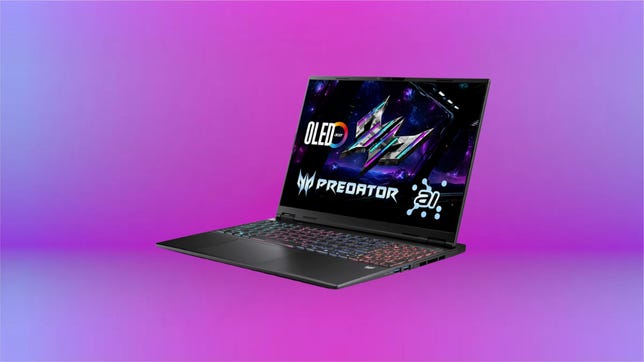
Acer makes more than just budget gaming laptops, and the company's flagship Predator Helios line has begun to solidify its place among the likes of Razer, Alienware, HP Omen and other higher-tier gaming laptops. The Acer Predator Helios Neo 16S AI certainly comes to play with an Intel Core Ultra 9 processor and Nvidia RTX 5070 Ti GPU powering a big, beautiful 16-inch 240Hz display. In testing, that impressive spec sheet lived up to our expectations and ran everything we could throw at it without missing a beat, matching and often surpassing the competition.
But this is still Acer we're talking about, and even with a high-end Predator Helios, pricing is kept in check. Our test system keeps the cost under $2,000, and it can often be found discounted to as low as $1,500 to $1,600. We love the performance it delivers for the price, but there are still some compromises you'll need to accept if you opt for the Predator Helios Neo 16S AI.
Acer Predator Helios 16S AI PHN16S-71-98RF
| Price as reviewed | $1,899 |
|---|---|
| Display size/resolution | 16-inch 2560x1600 240Hz OLED |
| CPU | Intel Core Ultra 9 275HX |
| Memory | 32GB DDR5 6400MHz |
| Graphics | NVIDIA RTX 5070Ti @ 115W |
| Storage | 1TB SSD |
| Ports | Thunderbolt 4, USB-C 3.2 Gen 2, USB-A 3.2 Gen 2 (x2), USB-A 3.2 Gen 1, HDMI 2.1, Ethernet, combo audio jack |
| Networking | Wi-Fi 6E, Bluetooth 5.4 |
| Operating System | Windows 11 Home |
| Weight | 4.8 lbs (2.2 kg) |
Subtle looks for a gaming laptop
Many gaming laptops are over designed in a misguided effort to attract attention, so I appreciate the subtle look of the Helios Neo 16S AI. When it's closed, aside from the RGB logo, you might not be able to tell from first glance that it's a gaming laptop. It's pretty thin at 1.01 inches at the thickest point, and it doesn't have any of the aggressive angles or extra design flairs from other gaming laptops. The aluminum top gives it a bit more premium feel as well.
The rest is all plastic and boy howdy, is it a fingerprint magnet. Under the lid is the spacious keyboard with full-sized numpad on the right side. I was pleasantly surprised with the keyboard; it wasn't as mushy as I was expecting and overall was pleasant to type on. I wouldn't recommend it for longer or more intense gaming sessions, but for a study break, it's great. It also has four dedicated RGB zones to customize if you so choose.

Even though it's fairly svelte, the Neo 16S still has a sizeable footprint as you might expect from a gaming laptop. It's 14-inches wide and just shy of 11-inches long, which makes it tricky to fit into some backpacks. It fit into the main pocket of mine, but it did not fit in the dedicated laptop pocket on the back. It also weighs 4.8 pounds, without including the charger, but gamers are certainly used to big, heavy laptops.
As of publish time, there are only two configurations of the Neo 16S available. The review model I was sent comes with the 5070 Ti and 32GB of RAM, while the base model drops it down to an RTX 5060 and 16GB of RAM. Both models are exclusive to Best Buy. My test model sells for $1,900, and the base model goes for $1,600. I monitored pricing at Best Buy while reviewing the Neo 16S and found that my test model was frequently discounted to $1,600, so keep an eye out for that price drop.

I was impressed to see that even though it's slim, both the RAM and storage can be upgraded fairly easily. I took out 10 screws to remove the bottom panel and found that neither the RAM nor the SSD is soldered down. There are two slots for both the RAM and storage, so as long as you know what you're doing, you can upgrade them yourself. If you want to go crazy, the Ultra 9 processor can technically support up to 256GB of RAM, so if you really need it, you can do it.
Predator Helios Neo 16S AI highlights
Obviously, the biggest draw of the Predator Helio Neo 16S is Nvidia's RTX 5070 Ti GPU that promises, in some cases, as much as a 30% bump in performance over the previous-gen 4070 Ti. In my testing, the 5070 Ti performed quite well, delivering some impressive results and 1080p frame rates. For example, Guardians of the Galaxy peaked at 177 fps, and Shadow of the Tomb Raider hit 219 fps as you can see below in the performance charts.
That's not bad considering Acer capped the GPU at 115 watts. Over clocking via Nvidia's Dynamic Boost is blocked, so sadly 115W is the most you're gonna get out of the 5070 Ti here. I understand the decision though because the Core Ultra 9 275HX is a beefy chip that's not cheap, and Acer had to make some compromises somewhere to keep the price under $2,000.

I'm not too upset about it, however, because the 24-core Core Ultra 9 processor not only delivers great gaming performance, but it also means everything else I do, things like video editing and -- if you're into it -- AI workflows, are also much faster.
Another highlight of the Predator Helios Neo 16S is the display. It's a 16-inch OLED panel with a 2,560x1,600-pixel resolution and a speedy 240Hz refresh rate with HDR support. It also supports Nvidia's G-Sync and Advanced Optimus features if you want to take advantage of those. Colors looked a bit too saturated at lower brightness levels and while on the iGPU, but once the 5070 Ti kicks in, the colors appeared much more vibrant and balanced.

Neo 16S AI quirks
Nothing is perfect and I experienced some frustrations with the Predator Helios Neo 16S AI that are worth noting. First, the fans. When the two cooling fans get going, they're quite loud. The sound didn't reach jet-engine levels, but it's certainly loud enough to be distracting. Even with headphones on, I could hear the fan noise, particularly during loading scenes and cinematics.
Unfortunately, the fans were also quick to kick on. Several times under light workloads of a few apps open with a dozen or so Chrome tabs, I would hear them kick on, and rev higher than I expected. Again, both the CPU and GPU are pretty power-hungry, but the fans are still louder than I wanted.

To be fair, this was much more common while in Acer's Turbo mode, but even in a performance preset like that, the fans shouldn't kick on under normal workloads.
The webcam is pretty bad. It's 1080p but produced a grainy picture closer to what I'd expect from a 720p cam. If you have good lighting, it looks passable for a video call, but only use it if you have to.
Battery life is shockingly short. Our battery test clocked in at just under two hours on our video streaming battery drain test. I ran the test on Balanced model, so you might be able to extend battery life a bit if you shift to Eco mode. You should never expect much battery life from a gaming laptop, but less than two hours is much shorter that what you get from other high-powered models.
I also ran into my fair share of bugs during my time with it. Several times during my month of testing, it would freeze and require a restart. Most annoyingly, it would continually wake from sleep while plugged into my monitor. I investigated as much as I could to attempt to find the culprit, but I couldn't track it down. Granted, this is more likely a Windows issue than something to do with the laptop, but it hasn't happened on any other laptop I've tested.
Is the Acer Predator Helios Neo 16S AI a good gaming laptop?
Overall, I was quite happy with my time using the Predator Helios Neo 16S AI. It played everything I threw at it, and the slim design made it much easier to carry around. The terrible battery life is annoying, but something I've grown used to from gaming laptops over the years. The biggest downside, apart from the Windows bugs, is the fan noise. For the price, it might be something you're willing to live with, as a good pair of gaming headphones will certainly help, just be prepared to hear them loudly and often.
The review process for laptops, desktops, tablets and other computerlike devices consists of two parts: performance testing under controlled conditions in the CNET Labs and extensive hands-on use by our expert reviewers. This includes evaluating a device's aesthetics, ergonomics and features. A final review verdict is a combination of both objective and subjective judgments.
The list of benchmarking software we use changes over time as the devices we test evolve. The most important core tests we're currently running on every compatible computer include Primate Labs Geekbench 6, Cinebench R23, PCMark 10 and 3DMark Fire Strike Ultra.
A more detailed description of each benchmark and how we use it can be found on our How We Test Computers page.
Geekbench 6 CPU (multi-core)
Geekbench 6 CPU (single-core)
Cinebench 2024 CPU (multi-core)
Cinebench 2024 CPU (single-core)
PCMark 10 Pro Edition
3DMark Fire Strike Ultra
Shadow of the Tomb Raider (Highest @ 1920 x 1080)
Guardians of the Galaxy (High @1920 x 1080)
Online streaming battery drain test
System configurations
| Acer Predator Helios Neo 16S AI | Microsoft Windows 11 Home; Intel Core 9 Ultra 275HX; 32GB LPDDR5 6,400MHz RAM; 8GB Nvidia GeForce RTX 5070; 1TB SSD |
|---|---|
| Alienware 16 Area-51 | Windows 11 Home; Intel Core Ultra 9 275HX; 32GB DDR5 3,200MHz RAM; NVIDIA GeForce RTX 5080 Laptop; 1TB PM9C1a Samsung |
| Asus ProArt P16 | Windows 11 Home; AMD Ryzen AI 9 HX 370; 32GB DDR5 5,600MHz RAM; Nvidia GeForce RTX 5070; 2TB SSD |
| Acer Nitro V 16S AI | Windows 11 Home; AMD Ryzen 7 260; 32GB DDR5 5,600MHz RAM; Nvidia GeForce RTX 5060 graphics; 1TB SSD |
| MSI Katana 15 HX B14W | Windows 11 Home; Intel Core i7-14650HX; 16GB DDR5 5,600MHz RAM; Nvidia GeForce RTX 5050 graphics; 512GB SSD |
| Acer Swift X 14 | Microsoft Windows 11 Home; Intel Core 7 Ultra 155H; 32GB LPDDR5 6,400MHz RAM; 8GB Nvidia GeForce RTX 4070; 1TB SSD |
| Dell XPS 16 9640 | Microsoft Windows 11 Home; Intel Core 7 Ultra 155H; 16GB DDR5 7,467MHz RAM; 8GB Nvidia GeForce RTX 4070; 1TB SSD |
| Lenovo Legion 5i 15IRX10 | Windows 11 Home; Intel Core i7-13700H; 16GB DDR5 5,200MHz RAM; Nvidia GeForce RTX 4050 graphics; 1TB SSD |