

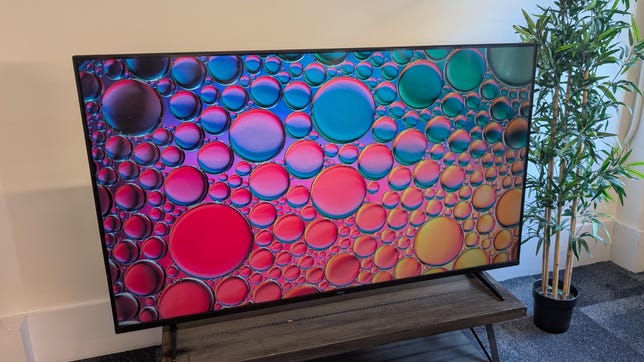
Pros
- Great interface
- Thoughtful usability features
- Low input lag for gaming
Cons
- Not the best value
- Competitors offer a punchier picture
When Roku announced it was making its own TVs, it seemed like a bold move, especially as the Roku-branded TCL and Hisense TVs were great in their own right. Roku now has three separate offerings, the Select, the Plus and the new Pro Series reviewed here.
Despite the name, the Roku Pro Series isn't the flagship you might expect. It's essentially a midrange TV that balances decent picture quality with some seriously great usability. The Pro TV isn't at the same performance level that we saw with the company's past collaborations with TCL, however. It offers the well-regarded Roku operating system, and its shadow detail and color are good. Yet, despite the inclusion of a full-array local dimming backlight powered by mini-LED, the TV's grayish black levels and poor test results temper its rating.
Meanwhile, the TCL QM8 is currently about the same retail price as the Roku Pro but has a more impactful picture, with better contrast and a much, much higher brightness. My advice to buyers of that TV who want the Roku streaming interface instead of the TCL's Google TV: Just add a $40 Roku Streaming Stick 4K to the TCL.
One other thing in the Roku Pro Series' favor is gaming chops. This TV includes 4K/120Hz support on two inputs, and has one of the best response times, with lower input lag, than any of the TVs we've tested recently.
Roku Pro Series TV sizes
I tested the picture quality of the 65-inch Roku TV Pro, but this review also applies to the other screen sizes in the series. All sizes have similar specifications and should exhibit similar picture quality.
Thoughtful design
It's notable that "Modern design sits flat against your wall" is one of the selling points the company touts. Some Roku TVs, such as 2019's TCL 6 Series, had a huge lip at the rear that prevented everyday, stock wall mounts from being used. Though the back of the TV is now indeed flat, generally the Roku's design itself is conservative, with a gun-metal gray bezel and a pair of splayed feet at either end. There is one part of the design I particularly like.
As someone who perpetually loses stuff, including remote controls, I'm pleased with the remote finder on the side of the TV. It's located conveniently next to the power button, which is also easy to find. One of my pet peeves is not being able to turn a TV off without a remote, mostly because I've already misplaced the clicker.

If you lose Roku Pro TV's remote, you can press a button on the TV to have it emit a locator sound.
The TV comes with the Roku Voice Remote Pro (second edition), which also ships with the Roku Ultra. The remote is rechargeable and has a hands-free microphone, which also can help you find it when it's gone missing. The remote is backlit and comes with a single programmable button.
It's a Roku you can see

The Roku interface remains our favorite for TV streaming.
Almost no TVs prioritize the screen's smart TV OS over the specifications of the actual display, but the Roku does. What I mean by this is that you won't find any "percent of DCI color space" or "X number of nits" in any of the Pros marketing or support material. It's a Roku, and for fans, that's often enough. So, this TV seemingly extends the Streambar's philosophy -- that device was a streaming box you could hear, and the Pro Series is a streaming box you can see.
Roku's interface has had some upgrades over the years -- most importantly, with the inclusion and subsequent expansion of the Roku Channel -- but the OS still offers an apps-first experience. Or in Roku parlance: channels. There are hundreds of them to choose from, including all the biggies, like Netflix, Hulu, Apple TV Plus, YouTube, Amazon Prime Video and Disney. If a service has an app, it's very likely here.
The main advantage of buying a Roku TV versus a separate set-top like the Roku Ultra, is that the TV's functionality is more tightly woven into the television. You don't need to juggle remotes to change picture settings and then search for a TV show, for example.
Gaming features galore

Two 4K/120Hz ports round out the Roku's gaming credentials
The Roku Pro Series is a mini-LED TV that features full-array local dimming, though Roku isn't forward about how many zones that equals. Even so, we did manage to confirm with the company that the 65-inch has 360 zones. Meanwhile, the Hisense U8N boasts 2,000 zones and the TCL QM8 has 5,000, but they're also more expensive. Generally, the more dimming zones a TV has, the better it'll be at extracting detail from low-light scenes.
The television sports a 4K resolution, and it has HDR compatibility with all the usual suspects, including Dolby Vision IQ, HDR10 Plus and HLG . In addition, the TV uses Quantum Dots in its backlight, designed to help the TV achieve better color than a "normal" LCD TV.
Other features include:
- Four HDMI inputs (one with eARC)
- 1 x USB 2.0 port, 1 x USB-C 3.0
- Wi-Fi 6 and Ethernet
- Optical digital audio output
- RF (antenna) input
For gamers, the TV has a number of features designed to accommodate gaming consoles. This includes an automatic game mode, compatibility with Freesync Premium Pro , ALLM, and VRR and 4K/120Hz support on two of the HDMI inputs.
Roku Pro vs. Hisense U8N vs. TCL QM8: Picture quality compared
For this review I set up a shootout of three 65-inch LED TVs -- the Roku R8BX Pro Seres, the TCL QM8 (2024) and the Hisense U8N. I watched them side by side in a theater environment, with the lights on, using a mixture of HD, 4K and gaming content.
TV and movies
What I appreciated most about the Roku is that even though its color didn't pop in the way it did with the class leading TCL, the Roku still treated color and shadow detail with a respectful touch. This was evident in both HD and 4K HDR material, and in some ways the TV performed better than the Hisense, which tended to blow out reds (and also crushed its shadow detail).
With HDR material, in this case the movie Oppenheimer, the Roku exhibited a naturalistic color palette that its Hisense rival couldn't beat. For instance, Bennie Saftie's (Uncut Gems) unkempt appearance as Hungarian physicist Edward Teller manifested as a very red facial tone on all these TVs. Though his face looked blotchy on the Roku, on the Hisense it was so crimson that he looked like he should immediately be admitted to the hospital. Meanwhile, the TCL's color was somewhere in between.
At the 01:51:26 mark in Oppenheimer (that is, at just about two hours into it), we see a launchpad set against a predawn sky, and on both the Roku and the TCL you can see a light in the sky and a hint of mountains in the background. Yet, there was no visible sky on the Hisense, and a shining light in the top third of the screen was also obscured. Both the TCL and the Roku made it look like the predawn, while the Hisense made it look like the scene was set in the dead of night.
Gaming
If you're a competitive or twitch gamer, then you're probably looking for a TV with the lowest amount of lag. Of the three midrange LCD TVs I looked at, the Roku Pro had the best response, and even more impressive was that its performance remained quick when playing games in 4K HDR. The downside to this speediness is that it isn't the prettiest in HDR. The Hisense and TCL looked more impressive with Ori and the Will of the Wisps, due to their much-higher HDR brightness.
I did find that changing the TV from 4K/60Hz to 120Hz couldn't be done on the fly and that the TV needed a restart. It wasn't a big deal, but it's something to be aware of, because this TV then passed the relevant compatibility tests within the Xbox Series X.
Bright lighting
I watched the Roku in a well-lit room but didn't experience any notable adverse effects from reflections. While the TCL and Hisense could rightly be described as "light cannons," the Roku was less than half as bright. Nonetheless, its score of 1.320 lumens is still acceptable for mixed-light usage.
Light output in lumens
| TV | Brightest mode (HDR) | Accurate mode (HDR) | Brightest mode (SDR) | Accurate mode (SDR) |
|---|---|---|---|---|
| Roku Pro Series | 1,320 | 1,320 | 1,327 | 720 |
| TCL QM851 | 3,183 | 3,183 | 3,084 | 1,262 |
| Hisense U8N | 3,175 | 3,175 | 3,168 | 1,112 |
| LG C4 | 1,213 | 968 | 414 | 390 |
| Samsung S90D | 1,218 | 1,201 | 505 | 182 |
| LG G4 | 1,799 | 1,420 | 792 | 792 |
| Samsung S95D | 1,734 | 1,666 | 544 | 265 |
| LG OLED65G3 | 1,378 | 1,378 | 725 | 724 |
| Samsung QN65S95C | 1,348 | 1,326 | 238 | 648 |
| LG OLED65C3 | 861 | 817 | 501 | 464 |
Notes on settings and picture mode
Though the Roku Pro Series lacks a Filmmaker mode, I did find that the Movie mode was the most accurate of the many options available. Gray scale may've been poor, according to the Konica Minolta meter, but generally the Roku's movie mode provided naturalistic colors and decent black and white performance.
It's worth noting that once the TV recognizes a gaming console, it'll switch itself to an internal gaming mode but will still display the last mode you had the TV in. There's no current way to activate a Game mode manually, and it doesn't exist on this TV anyway.
Roku 65R8BX Pro Geek Box
| Test | Result | Score |
|---|---|---|
| Black luminance (0%) | 0.018 | Good |
| Peak white luminance (SDR) | 1,327 | Good |
| Average gamma (10%-100%) | 2.23 | Good |
| Average gray scale error (10%-100%) | 5.70 | Poor |
| Dark gray error (30%) | 6.50 | Poor |
| Bright gray error (80%) | 6.34 | Poor |
| Average color checker error | 7.92 | Poor |
| Average saturation sweeps error | 4.36 | Average |
| Average color error | 3.93 | Average |
| 1,080p/24 Cadence (IAL) | Pass | Good |
| Input lag (Game mode) | 9.966666667 | Good |
| HDR10 | ||
| Black luminance (0%) | 0.005 | Good |
| Peak white luminance (10% win) | 1,367 | Good |
| Gamut % UHDA/P3 (CIE 1976) | 96.79 | Good |
| ColorMatch HDR error | 1.87 | Good |
| Avg. color checker error | 2.49 | Good |
| Input lag (Game mode, 4K HDR) | 9.40 | Good |
Check out how we test TVs for more details on the Geek box and our TV testing methodology.
Portrait Displays Calman calibration software was used in this review.
