

Today's music streaming services give you unprecedented access to all your favorite artists while also helping you unearth new gems. Sound quality is better than ever, and many of the paid subscriptions now include lossless quality for free. It's not just about music anymore, either. Audiobooks and podcasts are must-have features, with Spotify and Amazon Music including both as part of their monthly fees. I've tested all the major services and compared all the relevant features, along with a full price breakdown. Here's what you need to know.
Our Picks

Spotify is a pioneer in music streaming and is arguably the best-known service. It offers several curated music discovery services, including its Discover Weekly playlist, and is constantly implementing new ones, such as Stations, an AI DJ, audiobooks and podcasts. After years of waiting, Spotify has rolled out lossless music for no extra charge.
Pros
- Lossless music on Premium for no extra charge
- Free version is robust
- Spotify Connect simplifies connection to devices
- Great playlist features including live "Jam"
Cons
- Free-service ads can be intrusive
- Podcast integration is awkward
- You're paying for audiobook access even if you don't use it

At two dollars less than Spotify, Apple Music offers quite a lot for the money, including 100 million tracks and iOS and Android compatibility. The service runs second to Spotify in terms of subscribers, but surpasses its rival in that it has hi-res lossless and spatial audio albums, plus the classical music app at no extra charge. In terms of the user experience there isn't much to it, a choice of music or podcasts, and I feel that the interface could do with a bit of sprucing up.
Pros
- Spatial and hi-res music included
- Combines your iTunes library with music you don't own, with a choice of music lockers
- Human music experts and algorithms help find music you'll want to hear based on what you play
- Tight integration with Apple HomePod and iOS devices
Cons
- Not as fun or feature-rich as Spotify

Though Tidal quietly did away with its free service, it also scrapped its $20 Hi-Fi Plus tier in favor of an all-inclusive $11 plan instead -- this means hi-res music for everybody. It's worth noting that the service is (still) replacing its proprietary MQA files with hi-res FLAC for better compatibility.
Pros
- High-fidelity music streams, including Dolby Atmos surround mixes
- Lots of video content, including concert livestreams
- Profiles and record reviews on every page, plus up-and-coming artist spotlights
Cons
- The mobile apps and web player aren't as straightforward as some others
- The catalog isn't as exhaustive as Spotify Premium
- Most high-res music uses MQA, which needs a specialized decoder
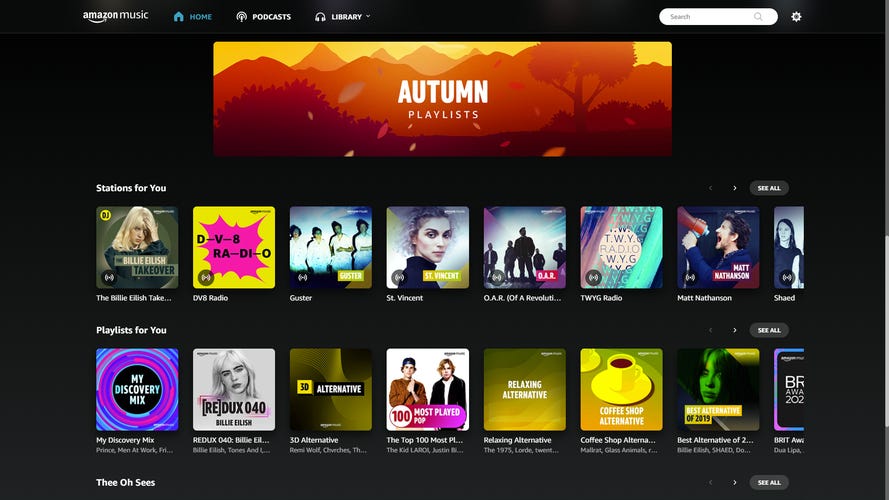
While Amazon Prime Music comes "free" as part of a Prime membership, users can choose to upgrade to Music Unlimited for audiobooks (one title a month) and higher-quality music streams. At $12 for Prime members, or $13 if you don't have Prime, Unlimited offers an expanded catalog plus Atmos audio mixes which can be played on Dolby Atmos soundbars, Android or iOS devices, and the Amazon Echo Studio. In terms of usability, the Music Unlimited interface is also more powerful than before with playlists, genres and podcasts all accessible from the main page.
Pros
- Cheaper than the top three if you're an Amazon Prime member
- Lyrics automatically pop up on the "now playing" screen
- Hi-res and spatial audio from Sony 360 Reality Audio and Dolby Atmos at no extra charge
- Offers free music stations for Amazon Echo, Echo Dot and Amazon Tap (includes ads)
Cons
- Artist profiles don't have biographies
- The service no longer includes a music locker

Qobuz's streaming service offers a wealth of music in hi-res, and you don't need a special hardware decoder to listen to it. The service offers two main plans: Studio Premier ($13 monthly or $130 yearly) and the $180 annual Sublime Plus. If you're a student, its new $5-a-month plan is a great value. Uniquely, the streaming service offers its own hi-res download store, and if you sign up for Sublime, you get a discount on purchases.
Pros
- The app is really clean and fun to use
- Ability to listen to 24-bit music without needing a specialized decoder
- Download store as well
Cons
- No spatial audio


French stalwart Deezer has been operating in the US since 2016, and it has a lot to offer, including a free tier (mobile only) and an impressive 120 million tracks. It has more subscribers than some others on this list, thanks in part to its previous affiliation with Cricket Wireless. The main Premium plan is $12 a month, and users are also able to upgrade their audio quality within the app. Deezer also offers a couple of great features, and was the first service to let users upload their catalogs from competitors at no extra charge.
Pros
- Hi-res music included
- Has a free tier
- Catalog conversion at no extra cost
Cons
- Plenty of competition at the price
What is the best music streaming service overall?
When choosing a music streaming service, it's a close race between two in particular: Spotify Premium and Apple Music. Both services boast extensive catalogs and plenty of features, but there is a clear winner. Despite a recent price increase to $13 a month, Spotify is the best streaming service for most people. It offers the best mix of features, including lossless music, audiobooks, Spotify Connect streaming and great community offerings, such as Spotify Wrapped (now it's not just for the holidays). Spotify also offers the best free tier: Without paying a dime or providing a credit card number, you can listen to millions of tunes on demand and stream to Wi-Fi devices.
For Apple device users, the excellent Apple Music is hot on Spotify's tail with the inclusion of spatial music, and it's also two dollars cheaper. However, Apple Music isn't as feature-rich or fun as Spotify, and it's not as recommendable to Android or PC users. Lastly, if you're an audiophile -- or simply love music -- then both Tidal and Qobuz offer excellent sound quality at realistic prices. Of those two, Tidal has taken pains to remove the proprietary MQA format and offer a cheaper fee, while Qobuz offers a point of difference in its download store.
Read more: Apple Music vs. Spotify: Comparing the Top Music Streaming Services
Best music streaming services of 2026

Pros
- Lossless music on Premium for no extra charge
- Free version is robust
- Spotify Connect simplifies connection to devices
- Great playlist features including live "Jam"
Cons
- Free-service ads can be intrusive
- Podcast integration is awkward
- You're paying for audiobook access even if you don't use it
Spotify is a pioneer in music streaming and is arguably the best-known service. It offers several curated music discovery services, including its Discover Weekly playlist, and is constantly implementing new ones, such as Stations, an AI DJ, audiobooks and podcasts. After years of waiting, Spotify has rolled out lossless music for no extra charge.
Spotify is great if you're seeking a solid all-around service, especially one that lets you make, browse and share playlists for any occasion. The company's year-end Wrapped is an institution and it has spawned "best of" imitations from most of the company's competitors. The service even introduced on-demand stats so you don't need to wait till year's end. Also, the ad-supported free version of Spotify is the best free music streaming service.
Spotify has undergone big changes in the last few years and which now includes 15 hours of audiobooks a month, and the new Page Match feature is a boon to people who swap between reading and then listening to the audiobook. While the company supposedly has a book-free tier for $11, it's not available to new users, though people can sign up for the audiobooks-only plan for $10 a month. With all of the added features, the service now costs $13 in the US, £13 in the UK and AU$16 in Australia, and the student rate will set you back $7 per month.

Pros
- Spatial and hi-res music included
- Combines your iTunes library with music you don't own, with a choice of music lockers
- Human music experts and algorithms help find music you'll want to hear based on what you play
- Tight integration with Apple HomePod and iOS devices
Cons
- Not as fun or feature-rich as Spotify
At two dollars less than Spotify, Apple Music offers quite a lot for the money, including 100 million tracks and iOS and Android compatibility. The service runs second to Spotify in terms of subscribers, but surpasses its rival in that it has hi-res lossless and spatial audio albums, plus the classical music app at no extra charge. In terms of the user experience there isn't much to it, a choice of music or podcasts, and I feel that the interface could do with a bit of sprucing up.
Though it makes the most sense if you're an Apple user, Music is an option if you're listening on a PC, Android, or have invested in smart speakers -- including those from Google. If you own an Apple HomePod, Mini or Nest device, you can summon Apple Music tracks with your voice. The service also features a ton of curated playlists, many handcrafted by musicians and tastemakers, although the service lacks the robust sharing options (or some of the cool add-ons) available to Spotify users.
If you're looking to move to Apple Music from its main rival Spotify, then Apple has released a tool which enables you to swap your libraries from one to the other.

Pros
- High-fidelity music streams, including Dolby Atmos surround mixes
- Lots of video content, including concert livestreams
- Profiles and record reviews on every page, plus up-and-coming artist spotlights
Cons
- The mobile apps and web player aren't as straightforward as some others
- The catalog isn't as exhaustive as Spotify Premium
- Most high-res music uses MQA, which needs a specialized decoder
Though Tidal quietly did away with its free service, it also scrapped its $20 Hi-Fi Plus tier in favor of an all-inclusive $11 plan instead -- this means hi-res music for everybody. It's worth noting that the service is (still) replacing its proprietary MQA files with hi-res FLAC for better compatibility.
The service also boasts a larger library than than most competitors, on paper at least, of 110 million tracks.
If you're an audiophile, a fan of urban music, or a mix of both, then Tidal offers a great catalog and a very attractive price.

Pros
- Cheaper than the top three if you're an Amazon Prime member
- Lyrics automatically pop up on the "now playing" screen
- Hi-res and spatial audio from Sony 360 Reality Audio and Dolby Atmos at no extra charge
- Offers free music stations for Amazon Echo, Echo Dot and Amazon Tap (includes ads)
Cons
- Artist profiles don't have biographies
- The service no longer includes a music locker
While Amazon Prime Music comes "free" as part of a Prime membership, users can choose to upgrade to Music Unlimited for audiobooks (one title a month) and higher-quality music streams. At $12 for Prime members, or $13 if you don't have Prime, Unlimited offers an expanded catalog plus Atmos audio mixes which can be played on Dolby Atmos soundbars, Android or iOS devices, and the Amazon Echo Studio. In terms of usability, the Music Unlimited interface is also more powerful than before with playlists, genres and podcasts all accessible from the main page.

Pros
- The app is really clean and fun to use
- Ability to listen to 24-bit music without needing a specialized decoder
- Download store as well
Cons
- No spatial audio
Qobuz's streaming service offers a wealth of music in hi-res, and you don't need a special hardware decoder to listen to it. The service offers two main plans: Studio Premier ($13 monthly or $130 yearly) and the $180 annual Sublime Plus. If you're a student, its new $5-a-month plan is a great value. Uniquely, the streaming service offers its own hi-res download store, and if you sign up for Sublime, you get a discount on purchases.
In 2025, the company added Qobuz Connect, which enables users to stream from the app to their compatible hi-fi, and takes on similar functionality from Tidal and Spotify.
At 100 million tracks, Qobuz's streaming catalog rivals Tidal's and Spotify's in number, and based on our tests, its catalog of more-obscure artists is now pretty impressive. Excellent sound quality at a decent price? Qobuz is our favorite service for serious music lovers who also want to be able to purchase tracks.

YouTube Music ($11 a month) is the successor to Google Play Music, and if you sign up for the ad-free YouTube Premium at $14 a month, you get YouTube Music for free. The good news is that YouTube Music is a mostly impressive service (the lower bit rate of 256Kbps is mildly disappointing), but Google has retained the predecessor's music locker system enabling you to upload new tracks. In even better news, YouTube Music offers a clean interface with over 100 million tracks to choose from. YouTube Music offers well-curated radio stations that play endlessly and are updated often. The service also has the ability to make playlists out of YouTube music clips, which makes it a worthy option. Lastly, the Apple HomePod has joined Google's Nest devices in enabling users to set YouTube Music as the default.

Pros
- Hi-res music included
- Has a free tier
- Catalog conversion at no extra cost
Cons
- Plenty of competition at the price
French stalwart Deezer has been operating in the US since 2016, and it has a lot to offer, including a free tier (mobile only) and an impressive 120 million tracks. It has more subscribers than some others on this list, thanks in part to its previous affiliation with Cricket Wireless. The main Premium plan is $12 a month, and users are also able to upgrade their audio quality within the app. Deezer also offers a couple of great features, and was the first service to let users upload their catalogs from competitors at no extra charge.
Top services compared
| Amazon Music Unlimited | Apple Music | Qobuz | Spotify | Tidal | YouTube Music | |
|---|---|---|---|---|---|---|
| Monthly fee | Prime members: $12, £12, AU$14; Non-Prime members: $13, £13; Echo-only service: $6, £6, AU$7 | $11, £11, AU$13 | Studio: $13, £13, AU$20; Sublime (per year): $180, £180, AU$250 | $13, £13, AU$16 | $11, £11, AU$12 | $11, £12, AU$12; YouTube Premium (includes Music): $14, £17, AU$17 |
| Free option? | Yes, with ads | No | No | Yes, with ads | No | Yes, with ads |
| Free trial period | 30 days | 90 days | 30 days | 30 days | 30 days | 30 days |
| Music library size | Over 100 million | Over 100 million | Over 100 million | Over 100 million | Over 110 million | Over 100 million |
| File type | 320 kbps OPUS, Up to 24-bit/192kHz FLAC | 256Kbps AAC, Up to 24-bit/192 kHz ALAC | Up to 24-bit/192kHz FLAC | 320Kbps Ogg Vorbis, Up to 24-bit/44.1 kHz FLAC | Up to 24-bit/192 kHz FLAC | 256Kbps AAC |
| Family plan? | Yes, $22, £22, AU$24 for max 6 | Yes, $17, £17, AU$20 for max 6 | Yes, $18, £18, AU$25 | Yes $22, £22, AU$28 per month, max 6 | Yes, $17, £17, AU$20 max 6 | Yes, $17 |
| Student discount | Yes | Yes, $6, £6, AU$7 | Yes, $5, £5 | Yes, $6, £5 with Hulu | Yes, $5.49, £5.49 | Yes, $5.50 |
| US military discount | No | No | No | No | Yes | No |
| Offline listening | Mobile and desktop | Mobile and desktop | Mobile and desktop | Mobile and desktop | Mobile | Premium, mobile only |
| Radio stations | Yes | Yes | No | Yes | No | Yes |
| Podcasts | Yes | No | No | Yes | Yes | Yes |
| Music videos | No | Yes | No | Yes | Yes | Yes |
| Music locker functionality | No | Yes | No | No | No | Yes |
Factors to consider

The principal thing you'll need to weigh is your monthly cost. Until recently, prices were stable at around $10 a month, but Apple Music, Amazon Music Unlimited, Tidal, YouTube Music and Spotify have all hiked rates up to between $11 and $13.
While your subscription fee can give you access to a number of features -- including classical music, karaoke and podcasts -- what it can also do is unlock higher-quality audio. Sound quality is also an important consideration, and most services offer lossless and/or Dolby Atmos music at no extra charge.
With the addition of audiobooks, both Amazon Music and Spotify offer an additional point of difference over the other services.
If you like to buy your own digital music, Apple Music and YouTube Music are the only services to offer a digital locker to store your existing library of songs, while Qobuz also offers a storefront (without a locker for existing libraries).
How we test streaming services
We've checked out the big names, including Spotify, Apple Music, Amazon Music, YouTube Music and Deezer, as well as smaller ones such as Tidal, Qobuz, and Pandora Premium, to see how each platform stacks up for your subscription dollar. All of the major services feature music catalogs of over100 million tracks and are supported by a host of different devices.
Given that all of the services basically have the same libraries, we evaluated each one based on:
- Ease of use
- Cost
- Features
- Sound quality
While YouTube Music offers objectively the "worst" quality based on numbers alone, most people won't notice a difference, especially on phones or Bluetooth speakers. The biggest boons for Spotify users, in particular, are that service's ubiquity, community features and ability to easily pair with other devices.
If the service was more yielding to PC and Android users, Apple Music would easily become the service we would recommend. In short, Spotify is better for users of almost any phone, smart device or computer.
We also tested
- Pandora Premium: Still one of the most popular streaming radio services in the US, Pandora also offers the a la carte Premium ($11 a month) and no-ads Plus ($5 a month). The result is more flexibility than most competitors, and Premium has gained plenty more subscribers in recent years, even if the service is not keeping up in terms of overall catalog size. Sadly, its audio quality is among the lowest available, even on the Premium subscription (192Kbps), and it doesn't offer enough of an incentive for an upgrade from its highly popular free tier. See at Pandora.
